
oneCORE roadmap
April 2026
De items zelf staan in het Engels.
Nieuwe functies 16
Extend max characters for Variable valueOpgeleverd
We have increased the maximum characters of the Variable's value to 2,000.
Update Order detail pageOpgeleverd
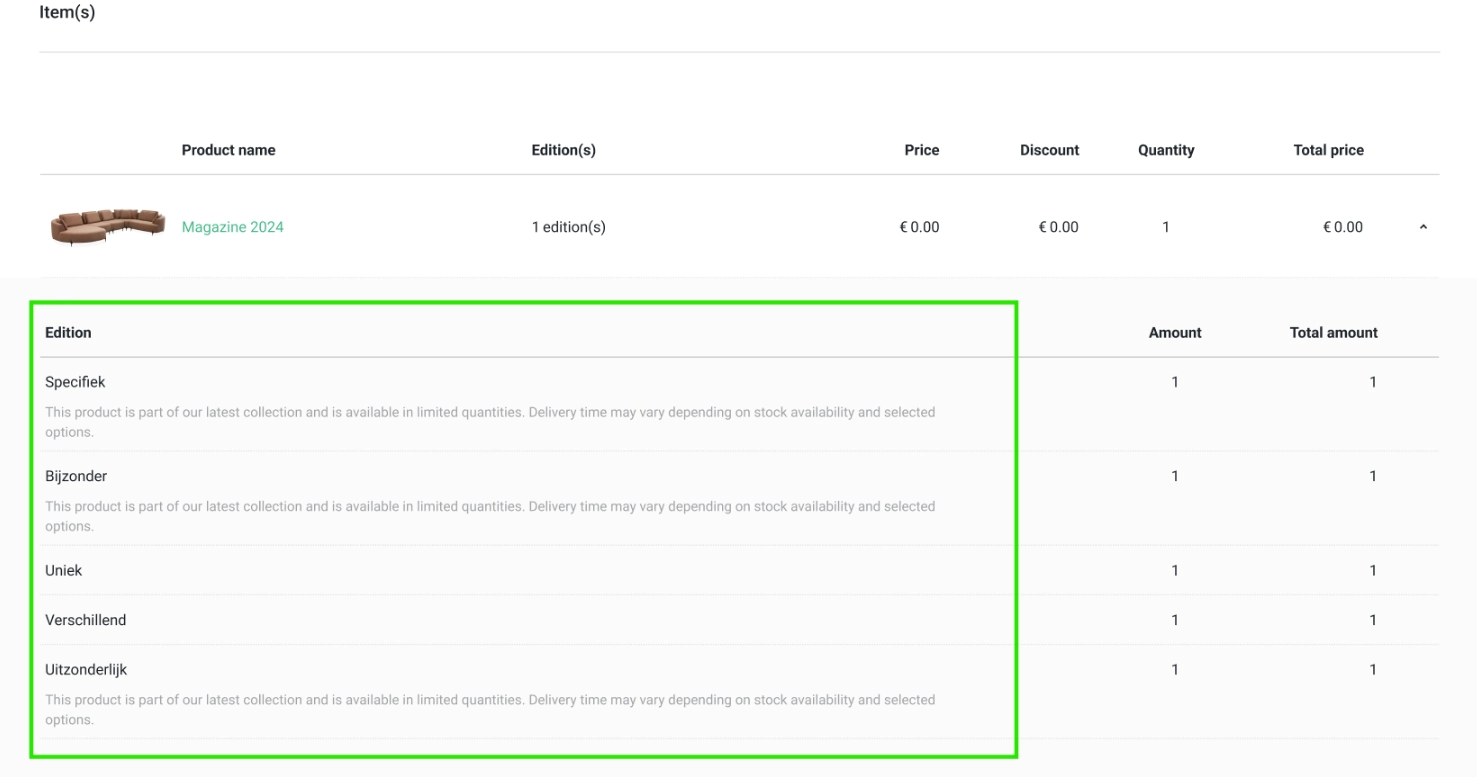
We added the configuration "Note" to order item and updated the created history to display the public API users who created an order.
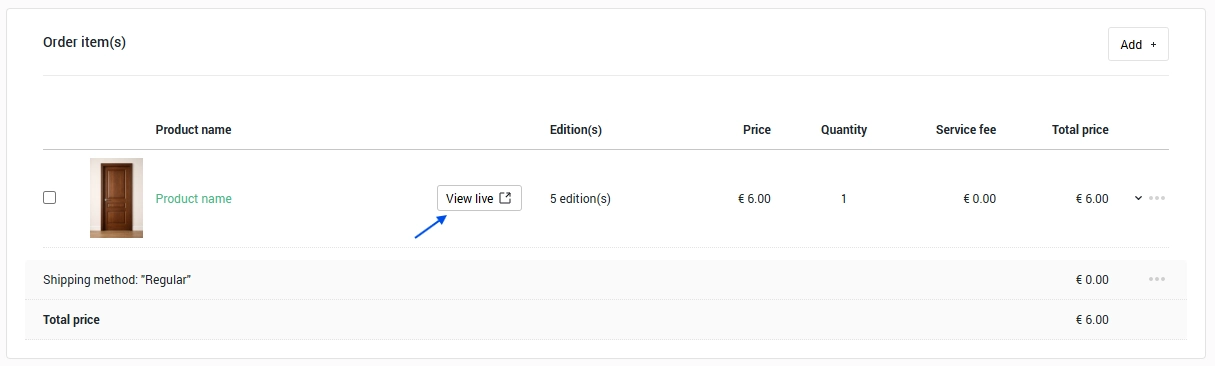
Add View live button to Order itemOpgeleverd
We added a "View live" button to the order item on the order detail page. On-click will navigate users to the product page on a live website with the same selection as in an order.
Please note that system can direct you to the configured dimension and state only for products implemented with oneCORE standard URL variation string.
"Address" field in Shop User AddressOpgeleverd
We implemented a new field "Address" in Shop user's address to store the house number with additional data e.g. house number suffix. This field is suitable for storing the conclusive data of house number in one field — for example, 240-55 1/3, 470 A, etc. In this task, we will support the use of this field only via Public API V2 (/api/v2/shopusers/{id}/addresses). The "Address" data will appear in Address section on Order detail page and in Address book on Shop user detail page.
The update of Dynamic form, Account functionality and Orderflow will be developed later.
Add Service Cost Support for QuotationsOpgeleverd
We have updated the Service and Additional Cost feature to support quotation, following positive feedback on its use for products and orders. You can configure and apply additional costs onto a quotation level. The setting to apply on "Orders" is updated to "Orders & Quotations" to support when creating orders and quotations, and when turning quotations into orders.
Create API V2 endpoints for 3D objectsOpgeleverd
We created the public API V2 endpoint to manage 3D objects as follows:
- /api/v2/object3d (GET list) — This endpoint retrieves a list of 3D objects.
- /api/v2/object3d/{id} (GET details) — This endpoint retrieves details of 3D objects.
- /api/v2/object3d (POST) — This endpoint creates 3D object.
- /api/v2/object3d/{id} (PUT) — This endpoint updates 3D object.
- /api/v2/object3d/{id} (PATCH) — This endpoint partially updates 3D object.
- /api/v2/object3d (DELETE) — This endpoint deleted 3D objects.
- /api/v2/object3d/{id}/assets (POST) — This endpoint uploads 3D files to 3D object.
- /api/v2/object3d/{id}/assets (DELETE) — This endpoint deletes 3D files in 3D object.
To check all available API endpoints, please visit this URL your shop/api-swagger.
Sort order editions function on Admin - EnableOpgeleverd
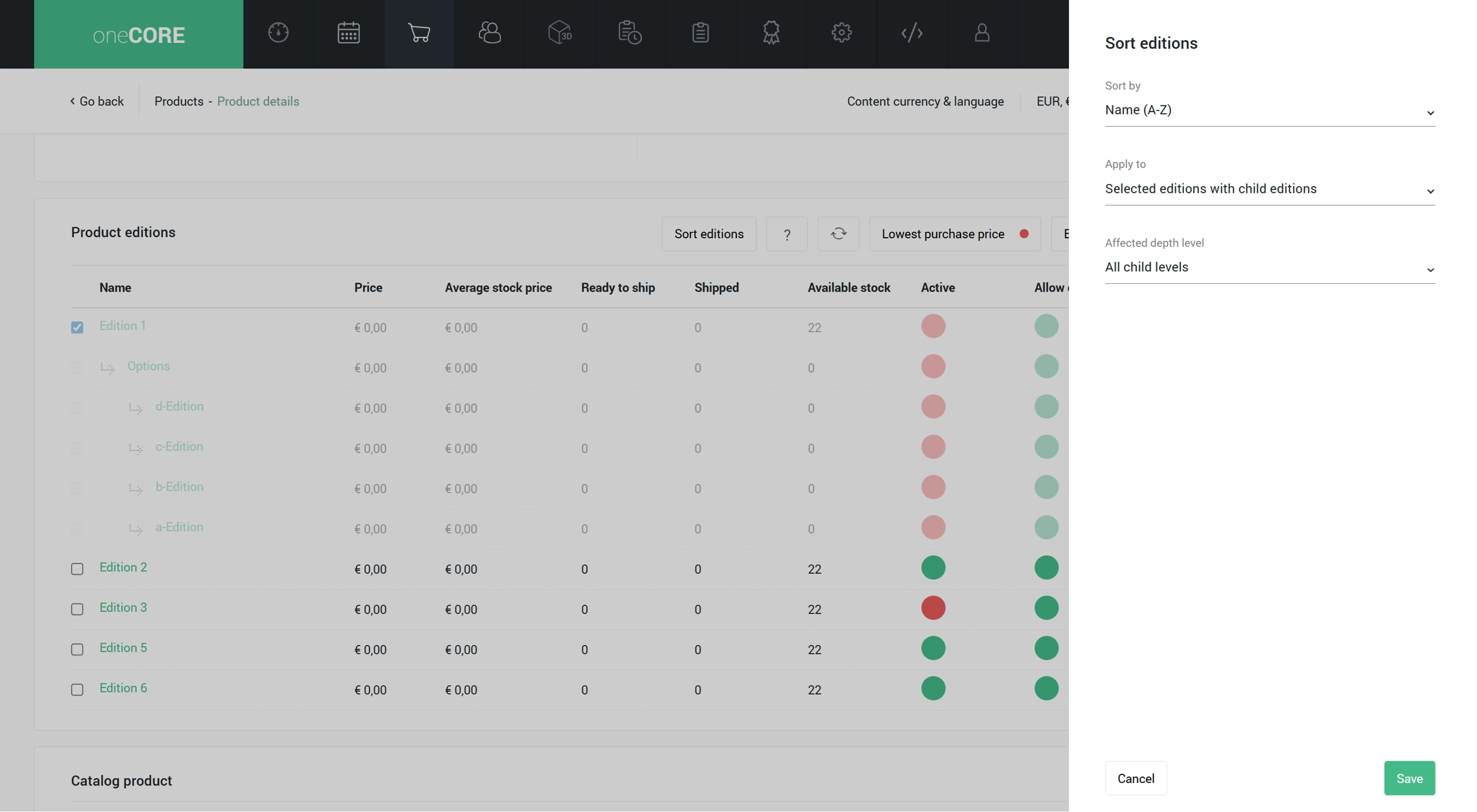
We enabled a function to sort order of product editions based on your chosen criteria — including name (A-Z, Z-A), most sold, recently added, selling price (low-high, high-low). The function will sort based on the present data at a moment of a request. For more flexibility, you can also define which edition levels to sort and how many depth levels to include, so you only need to request the highest edition level instead of all product editions.
- Apply to "Selected editions with child editions" — to sort the selected editions and its child editions.
- ํIf this condition is selected, you can configure "Affected depth level" in case you would like to sort only 1 or more child level.
- Apply to "Only child editions of selected editions" — to sort only the child editions of the selected editions.
- Apply to "Only selected editions" — to sort only the selected editions.
Add priority to Render3D endpointOpgeleverd
We added "Priority" to the Public API V2 endpoint to create 3D render queue (POST /api/v2/render3d), allowing users to manage the priority of the 3D render queue requested via API.
Remove Language Code from Wishlist URLOpgeleverd
According to the oneCORE platform's standard integration of a system page type, we have removed the language code from the Wishlist page URL.
Update copy product/edition to copy 3D objects to new Master editionsOpgeleverd
We improved the copy functionality for Products and Editions to ensure that 3D objects are consistently retained. When copying a product or creating a new master edition via edition copy, the associated 3D objects from the original master edition are now automatically selected for the new master edition. This enhancement applies to both same-company and cross-company copy scenarios, ensuring a more seamless and consistent duplication process.
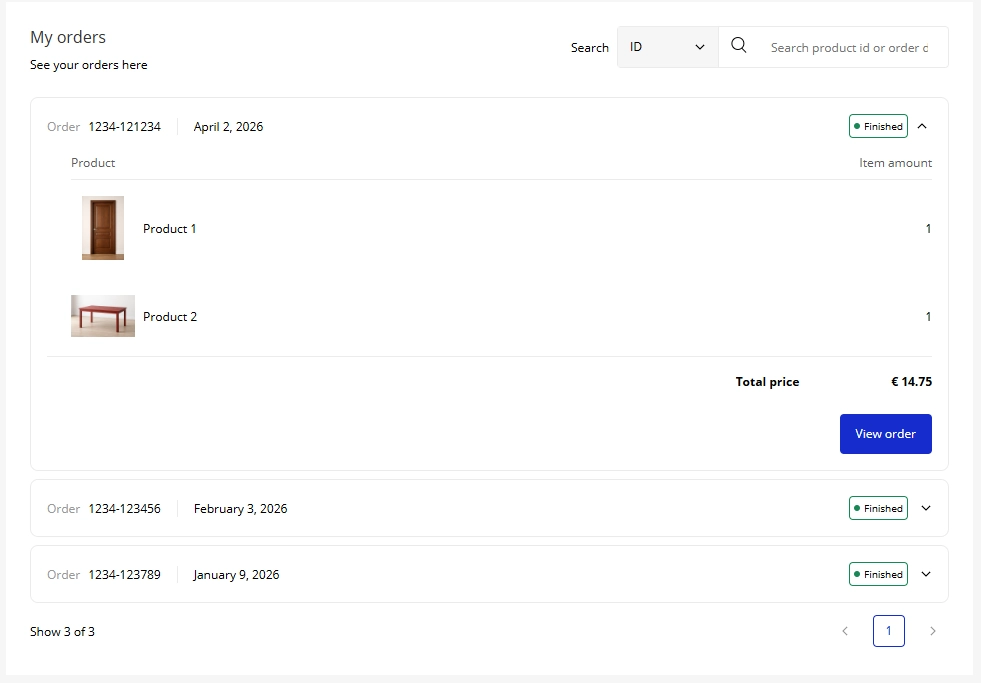
Create MyOrders component for Account function v2Opgeleverd
We created a new Account Functionality V2 component "MyOrders". This component will display all orders, allowing users to see a list of their orders with brief details of each. Customers can continue their check-out or re-enter the Orderflow to see the full details of each order from the component. Customers can search for their orders by using order ID, product ID or order created date.
The set-up guideline is provided in Account Functionality V2.
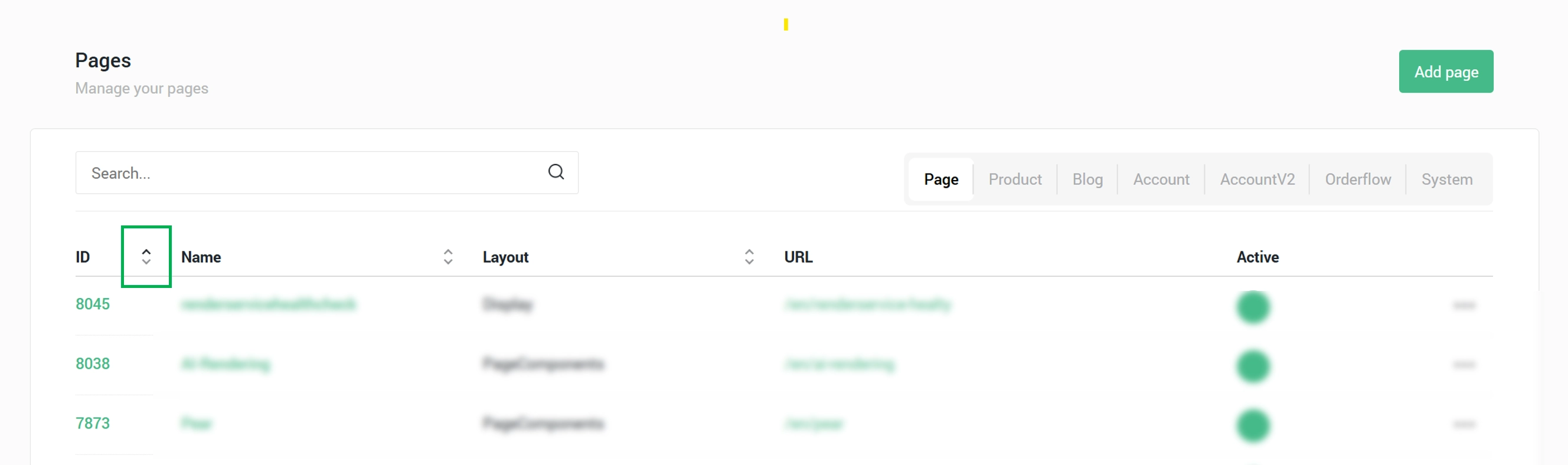
Add sort order by page ID to Page managementOpgeleverd
We have added sorting function in Page Management, allowing users to organize pages by their IDs. This sorting option is available in Page, Category, Product, and System page types.
Additionally, the default list view has been updated to display pages from newest to oldest (descending by creation date), improving visibility of recently created pages.
Company behavior - Login session expiration timeOpgeleverd
We introduced a new setting to control how long customers remain logged in to a shop. This can be configured under “Sliding login expiration” in Company Behavior within Settings.
By default, the setting is “None”, which follows the current behavior of keeping customers logged in for exactly 1 day without extension. You can now configure the expiration period from 1 to 7 days, with automatic extension if customers log in again within the defined timeframe. Regardless of this automatic extension, customers will be required to re-authenticate after 30 days after the first log-in.
Please note that the configured expiration time depends on the capabilities of the authentication provider. If the provider does not support extended session durations, the configured setting may not be fully applied.
Customer Insight featureOpgeleverd
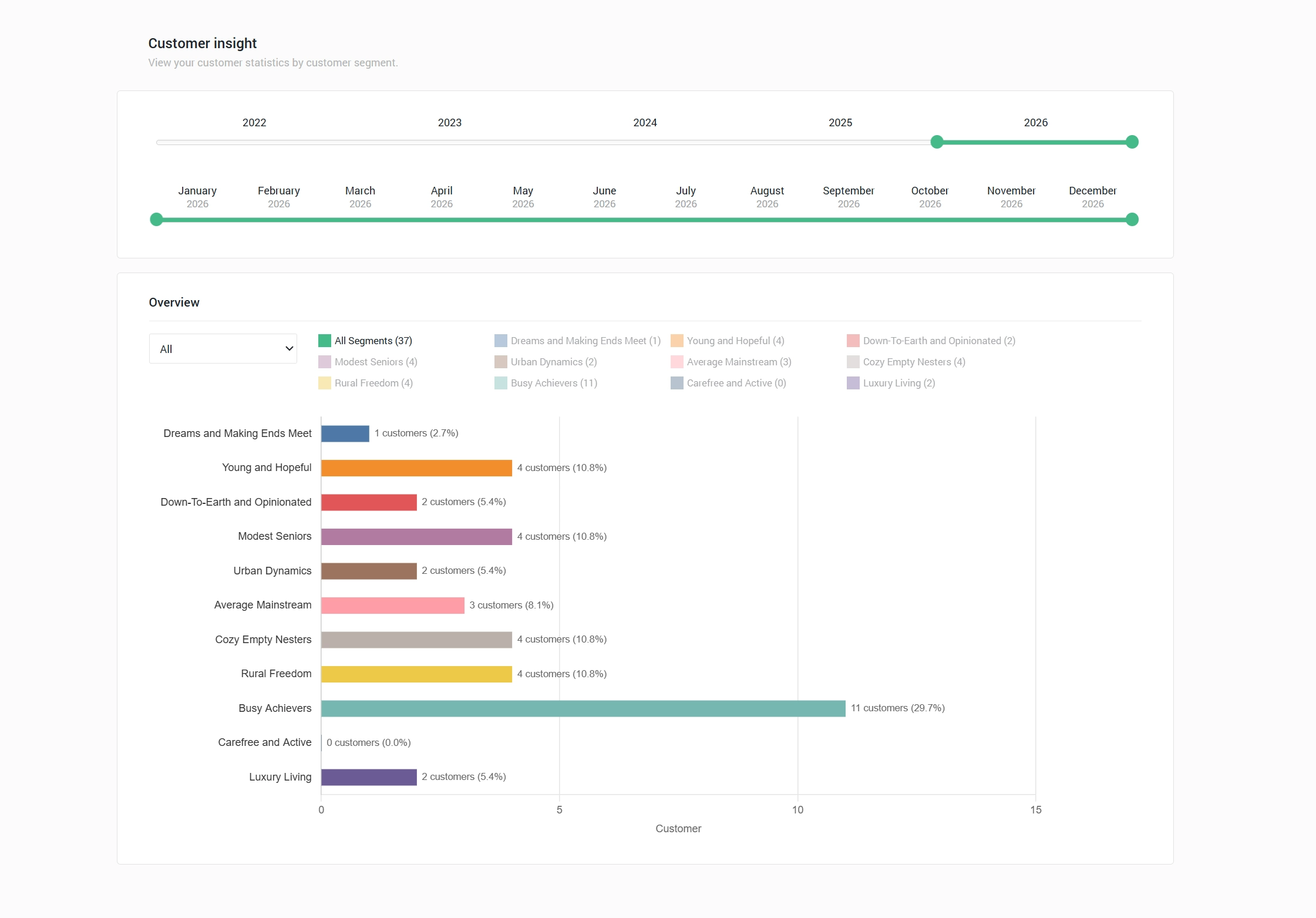
We introduced a new Customer Insight feature that provides an overview of your customers and sales. These insights are connected with sales data from orders and quotations, allowing you to analyze how different customer segmentations contribute to your business over time and helping you better understand different customer groups and their behaviors.
We have started with a segmentation based on Customer Segments, analyzed from customers' address details. The segment is only available for the Netherland address.
An overview of the relationship between segmentation and sales (quotations and orders) is available in the Customer Insight dashboard, with filters by period, sales and classification. Besides, Customer Insight of each address can be tracked via Shop user detail page.
Read more about this feature Customer Insight feature.
Product configuration picker for component editorOpgeleverd
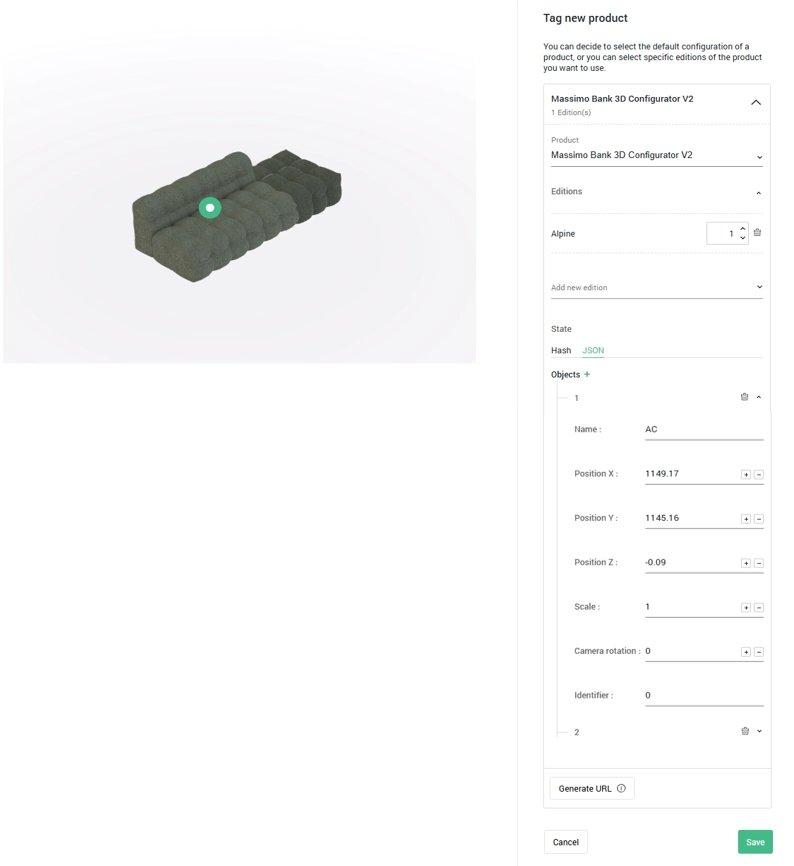
We have implemented a Product Configuration selection to the component, allowing you to specify the product with more precise details:
- After the product is selected, users can select edition, edition's amount, dimensions, and state.
- After the product is selected, users can enter the configuration's variation string into "Edition" field and system will automatically fill out the editions, edition's amount, dimensions and state based on the variation string.
- User can generate the product URL including variant based on the configured product.
- Users can specify the configuration's state by hash or manual enter with Json format.
- Users can sort the order of the product configurations.
Add filter by CompletedDate to GET 3D rendersOpgeleverd
We’ve extended the API v2 to retrieve a list of 3D renders (GET /api/v2/render3D) to support filtering by CompletedDate.
- Completed status filter
- Completed=true → returns completed renders
- Completed=false → returns uncompleted renders
- Completed=null (or not provided) → returns all renders
- CompletedDate field added
- A CompletedDate field is now included in the response to indicate when a render was completed.
Bugfixes 9
Unable to Remove Suppliers from Admin PanelOpgeleverd
We add "None" option to the Supplier in Edition setting.
Invoice is generated without API settingOpgeleverd
We resolved an issue of generating order's invoice. The invoice will be generated if there is an API setting in a company level. If there is no setting in company level, system will look up for the API setting in an organization level.
Fix Stock Title & Description Fallback Input State BugOpgeleverd
We fixed an issue that stock description couldn't detect the input immediately from pasting action.
Account V2 login page redirect to account V1Opgeleverd
We fixed an issue on the Account functionality V2 that customers login on a login page of Account functionality Version 2, but system redirected them to the Version 1.
Access account page but land onto empty /accountOpgeleverd
We resolved an issue found when customers tried to directly access the specific page on the Account functionality V2 via URL but were redirected to empty log-in page instead.
Page search result return with parent levelOpgeleverd
We have updated the search function on Blogs and Account V2 page management to show the search result in hierarchal orders, in order to output the precise Page URL of the child pages.
Unable to Sort & Filter ProductsOpgeleverd
We fixed the error on "sort and filter" products.
Fix Sync Editions functionOpgeleverd
We fixed and enhanced the Sync editions function to support the following aspects:
- Sync a large number of product and editions: a function now supports syncing multiple edition settings to a large number of products and editions within one request, without error. Please note that this enhancement can increases the function’s capacity, but the processing time will still depend on the volume of products and editions involved. To ensure optimal performance, we recommend minimizing the scope of each sync action (i.e., fewer settings and fewer products per request) for each sync action.
- Sync across company: edition settings can now be synced across products belonging to different companies within the same organization.
- Sync within catalog or across catalog: When the “Sync only in this catalog product” option is set to “Yes”, the sync will be limited to editions under the same master edition within the same catalog product.
- Remove Country from an Edition sync function.
- Remove Sync all editions function
Configuration Rule Always Saves Dimension to EqualOpgeleverd
We fixed an issue where updating the dimension setting would always save the rule as “If equal”, regardless of the selected condition. The rule is now correctly stored based on the configured value.
Onderhoud 9
3D look alike in Product image tag and Media imageOpgeleverd
We have enhanced the product and edition selection on Product image and Media image to allow users to specify the product with more precise details:
- After the product is selected, users can select edition, edition's amount, dimensions, and state.
- After the product is selected, users can enter the configuration's variation string into "Edition" field and system will automatically fill out the editions, edition's amount, dimensions and state based on the variation string.
- Users can specify the configuration's state by hash or manual enter with Json format.
Enable Editing of Section Identifier After CreationOpgeleverd
We updated the Component section to allow editing the section's identifier.
Remove MolliePartnerId & MolliePassword from Company tableOpgeleverd
We removed MolliePartnerId & MolliePassword from Company table.
Update Favicon for oneCORE platformOpgeleverd
We updated the oneCORE platform and oneCORE authentication favicon.
Adjust Replace image functionOpgeleverd
We updated the "Change image" function in product images to not sync the new image to a copied product. When a product was copied and its images are replaced, the new image will not be synced to all copied products; the change is made only to the modified product's image.
Remove /api/v2/databaseusagesOpgeleverd
Following the release of Public API V2 for retrieving organization data usage (/api/v2/usages) on March 9, 2026, which was intended to replace the previous endpoint (/api/v2/databaseusages), the database usage endpoint will be deprecated and removed.
Please revise any associate flows integrated with this endpoint by migrating to use a new endpoint.
Remove ProductId from Order table – ProductsOpgeleverd
This update is part of removing unused data "ProductId" from order.