
oneCORE roadmap
May 2026
New features 10
Add Combination Price Group PrefixCompleted
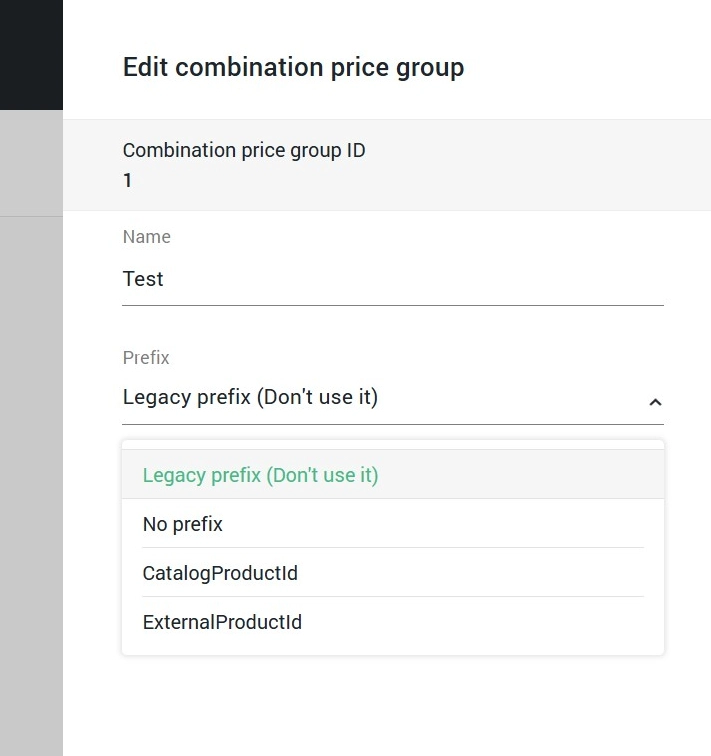
You can now set up different Combination Price structures for the same product. With the new Prefix setting in Combination Price Groups, you can now define different combination price structures within the same product, making your pricing setup more dynamic, cleaner, and easier to maintain with significantly fewer duplicate records. See example in Combination price groups.
When setting up or editing a Combination Price Group, you'll now see a Prefix option with three choices:
- No prefix— for combinations that don't use an identifier at the beginning. Best for straightforward setups.
- CatalogProductId — for combinations that begin with the product's Catalog ID. Use this if your pricing can be varied based on catalog.
- ExternalProductId — for combinations that begin with the product's External ID. Use this if your pricing is varied based on products driven by external system or ERP.
Update API V2 Quotation endpoint to include ServiceCostCompleted
We added ServiceCostIds to these following public API endpoints, allowing users to manage the service and additional costs of the quotation via a public API:
- /api/v2/quotations (POST, PUT and PATCH)
- /api/v2/quotations/{id}/products (POST, PUT and PATCH)
- /api/v2/quotations/{id}/orders (POST)
Add Dynamic Content selection in Category, Product, TagCompleted
We supported the Dynamic Content in Categories, Products, Taxonomy tags, allowing users to select the dynamic content from these features. Users can edit the selected dynamic content directly when working on these features. Besides, we updated a function to copy and sync products to include the dynamic content.
Display Configuration 'Note' on Quotation Summary and OrderflowCompleted
We added the configuration "Note" to quotation item and Orderflow.
Add ContactEmail to Shop user AddressCompleted
We implemented the new feature to allow shop users to use different email from their shop user account in their address. In initial phase, we will focus on the possibility to save different email on Orderflow, Account functionality — V1 and V2, Admin Interface — Order details and Shop user details, API V2 Shop user address endpoint. When enabled, shop users can enter additional email to address, and the email will be saved to "ContactEmail".
- Orderflow — Email address in a contact form will be saved to ContactEmail as additional email.
- Account functionality V1 and V2 — Email address in Account Information is still saved as primary email, while email address in Address book will be saved to ContactEmail.
- Order details and Shop user details — Both shop user email and ContactEmail will appear in Address.
- API V2 Shop user address endpoint — Both shop user email and ContactEmail can be managed and retrieved via Public API.
Important note:
Please be informed that the additional email or ContactEmail in shop user address is not fully supported across the oneCORE platform. This feature is available for early adoption, but we recommend evaluating it carefully before enabling it in production.
Please contact the Client Success Project manager for enabling this feature.
Active Status in Page Component and UI EnhancementCompleted
We've added an Active/Inactive status to page components across all page types — Pages, Blogs, Products, Category, Account V2, Orderflow, and System, allowing you to control over what appears on your pages without having to delete and rebuild.
- Toggle the component's status directly in the main component editor or within a section — no need to delete a component just to hide it from the front end.
- All existing components have been set to Active automatically, so there is no change to your live pages.
- Any new component you create will start as Inactive by default, giving you time to set it up before it goes live.
- When copying a page or a component, the status is copied along with it.
Skip Orderflow Login Step FeatureCompleted
We've added a new setting under Company Settings > Orderflow — SkipAuthenticationStep — which controls whether the Authentication step is shown to customers entering the Orderflow.
- When the setting is disabled, customers will land on Step 1 (Authentication) as the first step.
- When enabled, the Authentication step is skipped, and customers will land directly on Step 2 (Contact).
Component Editor Support on Orderflow Page TypeCompleted
We've added component editor support for the Orderflow page type, allowing you to customize the content shown to customers at each step of the order flow.
8 pre-built pages are now available under the Orderflow page type, each corresponding to a specific step or order status. Page names are editable and has no impact on the integration:
- Contact — configure the content shown on the contact step.
- Shipping — configure the content shown on the shipment step.
- Payment — configure the content shown during deposit and payment method selection.
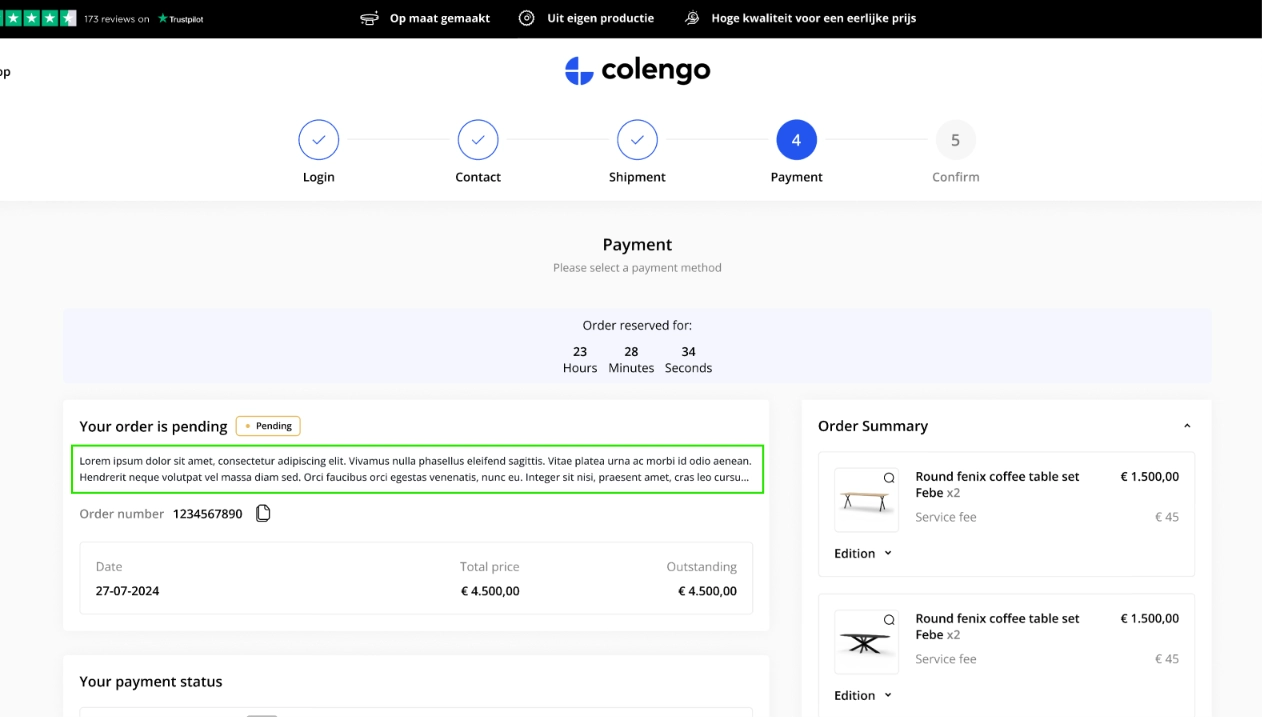
- Payment Pending — configure the content shown when a payment is in pending status.
- Processing — configure the content shown on the confirmation step when an order is processing.
- Cancelled — configure the content shown on the confirmation step when an order is cancelled.
- Declined — configure the content shown on the confirmation step when an order is declined.
- Finished — configure the content shown on the confirmation step when an order is finished.
Active status support — Components on Orderflow pages can now be set to active or inactive.
Note: View edit mode and view live are not supported for the Orderflow page type and will not appear for these pages.
Example of position where content on "PageDescription" component will appear.
Create MyWishlist component for Account function v2Completed
We added a component "MyWishlist", giving customers a centralised place to view and manage the products they've saved. Products that are deleted or inactive will be hidden automatically. Customers can take the following actions from the wishlist:
- View product — opens the product page with the customer's previously selected editions and state.
- Delete — removes a product from the wishlist.
- Clear list — removes all products from the wishlist at once.
Create API V2 ServiceCosts endpointCompleted
We created the API V2 ServiceCosts endpoint for managing the service and additional cost.
- /api/v2/servicecosts (GET list) — This endpoint retrieves a list of service and additional costs.
- /api/v2/servicecosts/{id} (GET details) — This endpoint retrieves details of service and additional cost.
- /api/v2/servicecosts (POST) — This endpoint creates a service and additional cost.
- /api/v2/servicecosts/{id} (PUT) — This endpoint updates a service and additional cost.
- /api/v2/servicecosts/{id} (PATCH) — This endpoint partially updates a service and additional cost.
- /api/v2/servicecosts (DELETE) — This endpoint deletes service and additional costs.
Bug fixes 10
Shop User Type in Shop User Details BugCompleted
We fixed the issue that the Shop user type labels were missing on the Shop user detail page.
Shop User Type in Shop User Details BugCompleted
We fixed the issue that the Shop user type labels were missing on the Shop user detail page.
"View live" button bugCompleted
We supported the Configuration state on the "View live" button on the Order detail page.
Incorrect Price on Orderflow and Quotation DetailCompleted
We fixed inconsistent price calculations on the Orderflow, Quotation detail pages in Admin, public API V2 Quotations, Orders and Order items endpoint to align with the standard rounding-up convention.
Comment not displayed in dynamic customer dataCompleted
We fixed the issue that the Dynamic Customer Data didn't display on the Quotation detail page.
Remove "Achievement" Role from Required Role to View Shop User ListCompleted
We removed "Achievement" role from a required role to view a Shop user list.
Maintenance 10
Create Product Sold Count jobCompleted
We created a job to calculate sold product counts, improving the performance of sorting products by “most sold” on category pages.
Remove Edition Version history functionCompleted
We removed the Edition version history feature.
Remove orderflow version setting from AdminCompleted
Following the release of Orderflow V2, which has proven stable and widely adopted, we removed the Orderflow configuration from Admin and standardized all tenants to use Version 2.
Orderflow - Render address as string instead of HTMLCompleted
We updated the Orderflow to render address details in plain text instead of HTML.
Remove Domain column from CompanyCompleted
We removed unused data from database.
Feature ProductAffiliateURL to Configure Product URL in FeedCompleted
We updated how the product URLs are generated in your product feed, making the product URLs cleaner and giving you control over affiliate tracking in product feed.
Currency
Previously, currency was appended directly to product URLs (e.g. /EUR). Currency is now removed if a shop supports single currency. Meanwhile, for multi-currency shop, the currency must remain to ensure that customers will land on to correct currency. Besides, we changed the currency to lowercase.
ProductAffiliateURL feature
This allows you to control whether the feed type is automatically appended to the product URLs if the affiliate tracking code is not configured. Disable or enable the ProductAffiliateURL feature in Settings >Shop features.
After this release, the feature is off by default. To append the feed type to your product URLs, you must enable it manually.
Once enabled, product URLs will have the feed type appended as the affiliate identifier.
- For example, https://colengo.com/nl/table/dining-table/afd/{feed_type}
- For example, https://colengo.com/nl/table/dining-table/eur
Add 2Code to Customer Insight nameCompleted
We updated the name of Customer Insight to include the code, such as, A01 - Getting by with kids, A02 - Getting by and single, etc.