
oneCORE roadmap
June 2026
New features 10
Update GET ProductEdition endpointCompleted
We updated the API endpoint to retrieve details of Product Editions (GET /api/v2/products/{id}/editions/{editionId}) as follows:
- Add GlobalTradeItemNumber, ServiceFees, Layout, IsDefault, ShowInConfiguration
- Fix Images "Urls" to output correctly
Create endpoint for Company InformationCompleted
We created API endpoint to manage Company Information as follows:
- /api/v2/company/information (GET details) — This endpoint retrieves details of company information.
- /api/v2/company/information (PATCH) — This endpoint partially updates company information.
- /api/v2/company/information (PUT) — This endpoint updates company information.
Add Collection to Dynamic ContentCompleted
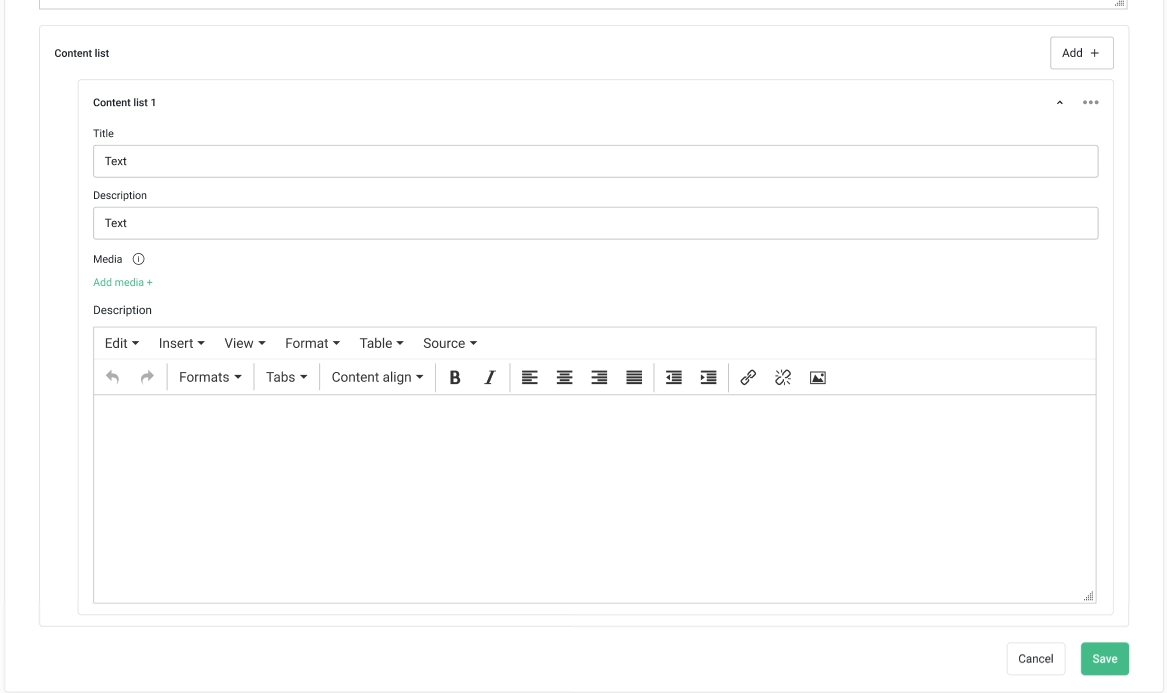
Dynamic Content now supports a new field type — Collection. Build structured, repeatable content blocks directly within your dynamic content setup, without workarounds or manual duplication. Update your dynamic content templates to apply Collection.
- Each collection supports all available component pickers — Single line text, Rich text editor, Dropdown selection, and Media
- Add multiple sub-collections within a collection to handle nested or grouped content
- Edit the sub-collection name for easier content management
Sync content across languagesCompleted
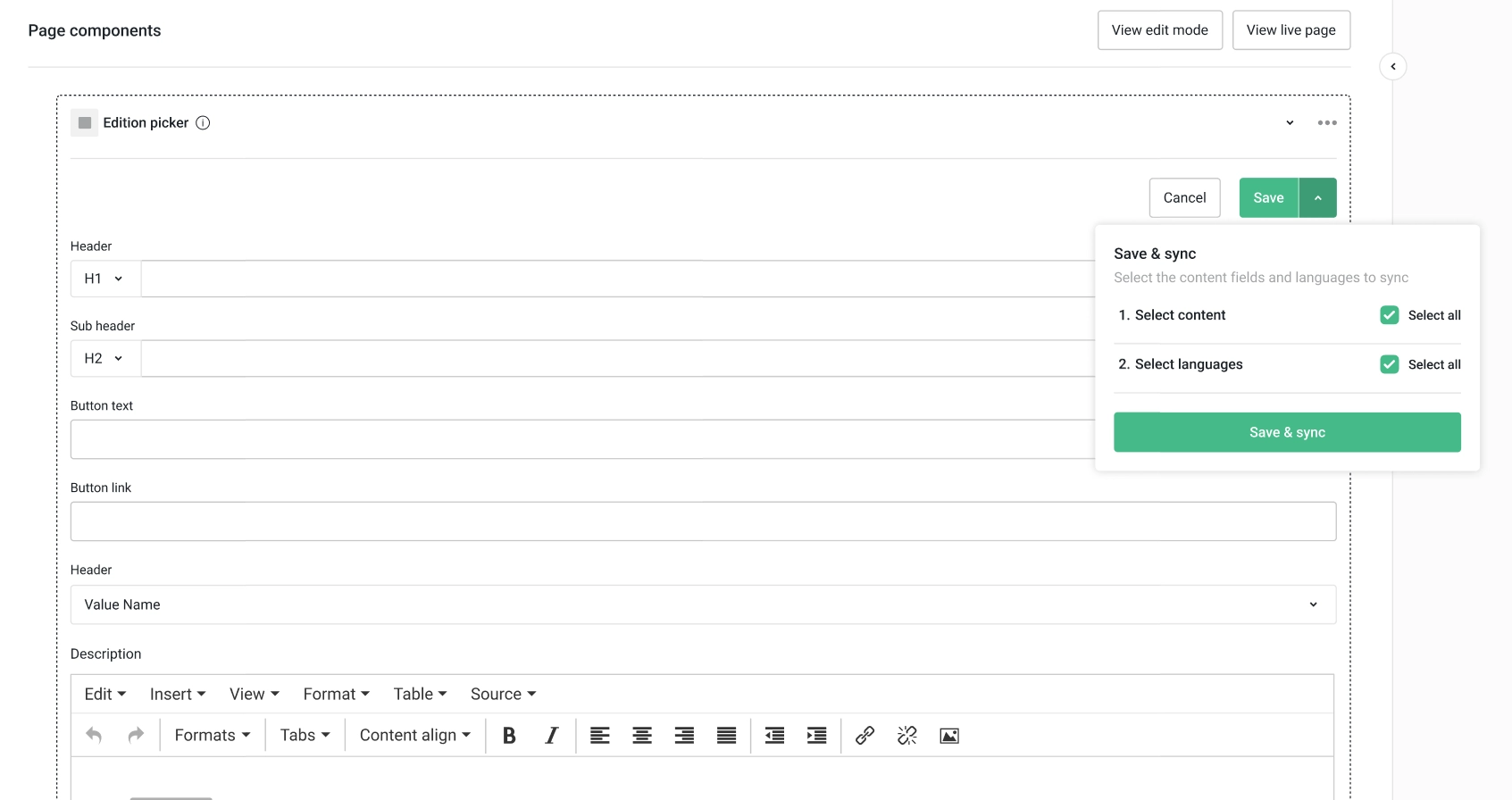
Managing multi-language content just got simpler. A new Save & Sync option in the component editor lets you push specific field content from one language to others in a single action — no more copying and pasting between language versions. Sync replaces any existing content in the target language, ensuring the selected fields stay consistent across languages
Select which fields to sync and which target languages to receive the content. Sub-collections cannot be selected individually for sync.
Please note that Save & Sync option is hidden on single-language shops.
Add Default Address to API V2 ShopUser EndpointCompleted
We added DefaultBillingAddressId and DefaultShippingAddressId to Shop users endpoint (PUT and PATCH /api/v2/shopusers/{id}).
Ability to Combine Multiple Accounts to a Shop user - Create New AccountCompleted
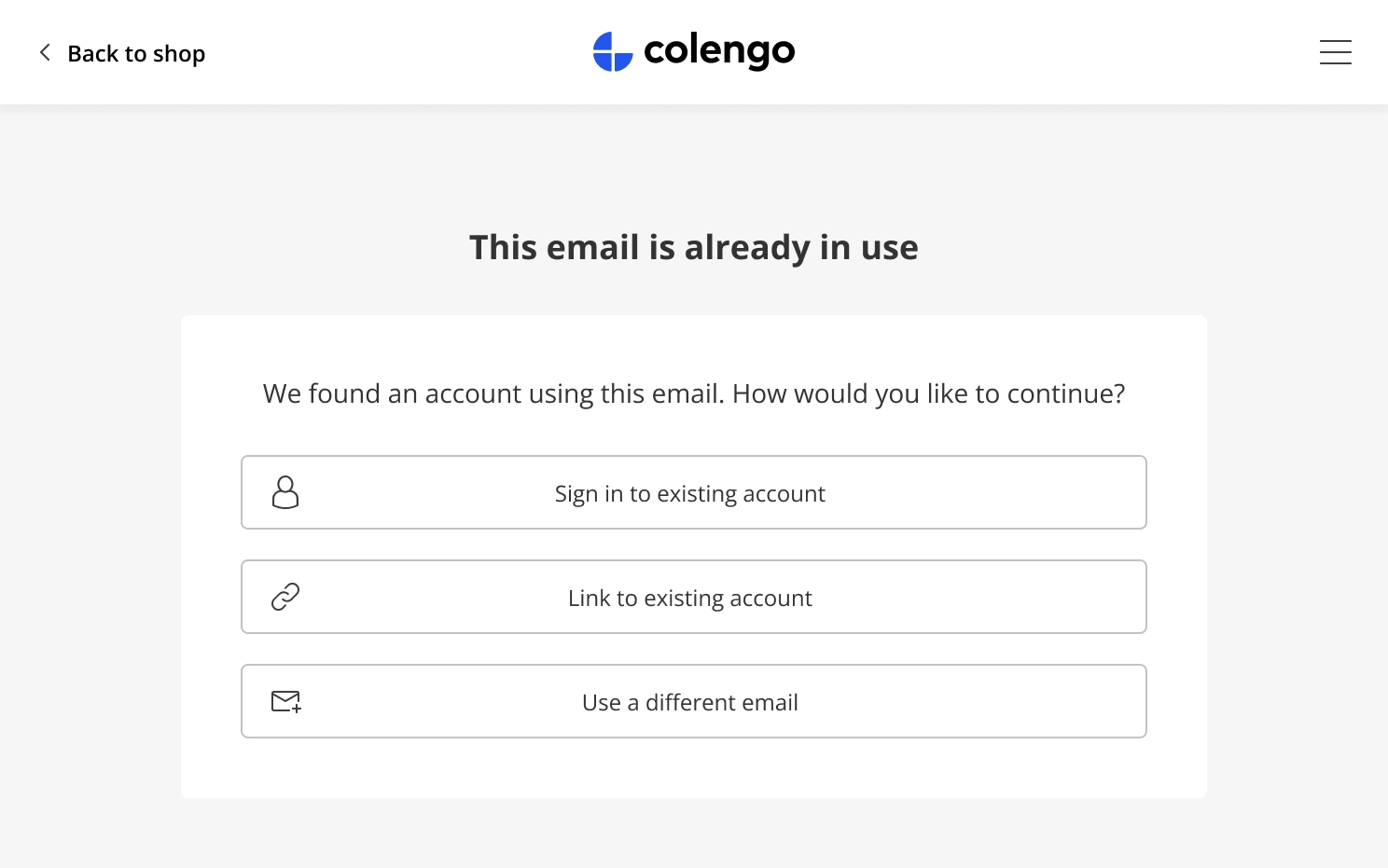
Multiple accounts from different authenticators can now be combined into one — no more duplicated emails or fragmented profiles. We have introduced an email validation flow at sign-up. When a new customer registers with an email address already associated with an existing shop user account, the system presents three options to continue:
- Sign in to existing account: upon successful authentication, the customer is logged in to the existing account. No new account is created.
- Link to existing account: upon successful authentication, the customer is logged in to the existing account with the new authentication method successfully linked. The customer can now log in with both the old and new providers.
- Create new account: the customer must sign up with a new, unique email address.
Additionally, the AccountOverview component in Account Functionality V2 has been updated with a new Sign-in method section, allowing customers to link or unlink authentication methods directly from their account.
Please note:
- An email validation flow is supported when Account functionality V2 is enabled.
- This change applies to shop user accounts only. Guest users can still be created with an existing email address.
- Existing shop user accounts are not affected.
- Customers are not allowed to check out if they did not complete the shop user registration.
Important note: please add this URL {shop_domain}/_auth0-link-account-callback to "Allowed Callback URLs" setting in your Auth0 Setting > Application URIs to ensure uninterrupted user experience during email validation flow.
Example from the email validation flow
Support Different Email in Address across oneCORE FeaturesCompleted
Following the initial release of ContactEmail in address, we have extended the feature across all oneCORE features. The ability to save a separate email address on an order address independent from the shop user account email is now a standard function applied onto the Orderflow and supported across all oneCORE features.
Shop users can enter additional email to address, and the email will be saved to "ContactEmail".
Please note that this feature doesn't apply to Guest accounts who don't register or sign in to the shop. Guest accounts can only use 1 email for their account and addresses.
- Orderflow — Email address in a contact form will be saved to ContactEmail as additional email and doesn't make change to account email.
- Payment provider — Sending email from Billing address to provider.
- Account functionality V1 and V2 — Email address in Account Information is still saved as primary email, while email address in Address book will be saved to ContactEmail.
- API V2 Shop user address endpoint — Both shop user email and ContactEmail can be managed and retrieved via Public API.
- Order search on order list — Both shop user email and ContactEmail can be used to search.
- Notification templates:
- The order-related templates are now using email in Shipping address as a primary email. System will use email from shop user account if shipping email is not present.
- The payment- and billing-related templates are now using email in Billing address as a primary email. System will use email from shop user account if billing email is not present.
Create API Endpoint to Create OrdersCompleted
We created an API endpoint to create orders (POST: /api/v2/orders).
To check the API endpoint, please visit this URL your shop/api-swagger.
Always Display Product VariantsCompleted
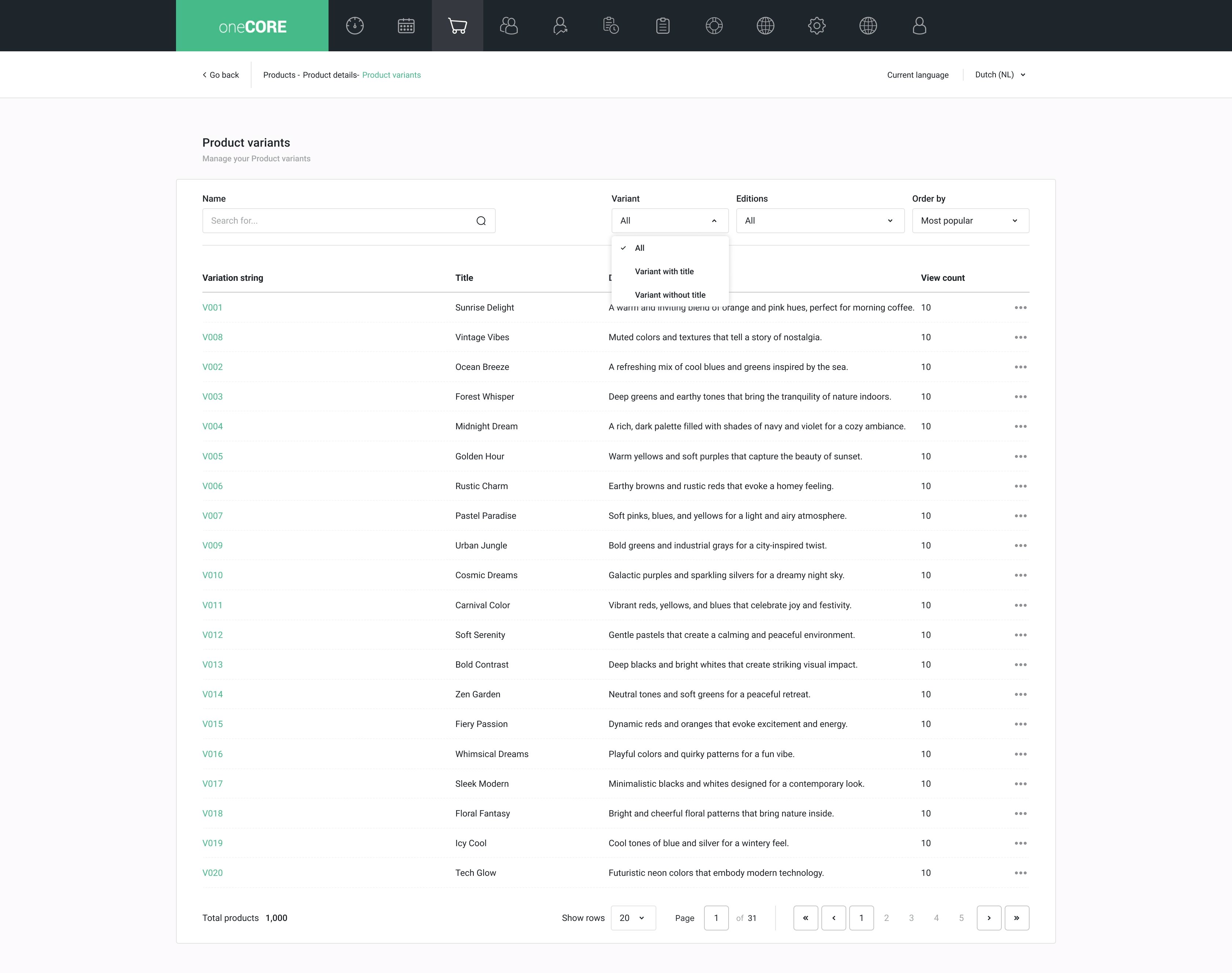
We have updated the Variant list page with new filtering, sorting, and visibility options to make it easier to find and manage variants at scale.
Filter by Variant: filter the list by title — with title and without title.
Filter by Editions: filter variants by their associated editions. Selecting edition(s) returns all variants containing that edition(s).
Order by: sort a list by Most view (default), Created (old - new), Created (new - old), Title (A – Z) and Title (Z – A)
Add Brand and Supplier to Product syncCompleted
We added "Brand" and "Supplier" to product sync, allowing users to sync these settings to products in the same catalog within and cross company.
Bug fixes 9
Fix Configuration Rule BugsCompleted
We fixed the following issues on Configuration rules:
- "Condition", "Select parent or child edition(s)" could not be configured if rule type is Dimension restriction.
- Dimension in "Auto select parent or child edition(s)" could not be configured in Select rule type.
Empty Collection When Update PagePageComponentsCompleted
We fixed the API endpoint to update PagePageComponent
(PUT and PATCH api/v2/pages/{id}/pagepagecomponents/{pagePageComponentId}) to allow deleting collection records. Upon sending "Values": [], collection records will be erased.
Page picker search does not return results for full page searchCompleted
We fixed an issue that searching for Page name with full page name on component editor did not work.
Unable to Update Location Latitude and Longitude via APICompleted
We fixed the API endpoint to update locations (/api/v2/locations/{id}) to allow modification on "Latitude" and "Longitude" when previous value was null.
Account V2 Breadcrumb CollapseCompleted
We fixed the breadcrumb display on Account functionality V2 that collapse if page title is too long.
Redirect to homepage after logout from Account V2Completed
We updated the Account functionality V2 to direct customers to homepage once users being logged out.
Maintenance 12
Remove ProductId from Order (code) – OrdersCompleted
This update is part of removing unused data "ProductId" from order.
Digital Product Purchase Job Failed - 8keysCompleted
We updated the logic to purchase digital code to stop if providers cancel our purchase request.
Remove Unused Payment ProvidersCompleted
We removed these following payment providers which will no longer be supported by oneCORE platform:
- Icepay
- TargetPay
- GingerPayments
- CmPayments
- GAPay
- Mempay
- Qantani
- WebBilling
- KlarnaPayment
- MultiSagePay
- Cash
- Paytrail
- Afterpay
- Payon
- Skrill
- SiamPay
- Omise
- HiPay
- Payvision
- CheckoutFri
- Buckaroo
- Payson
- EPay
- FacebookLike
On the Payment limit rule, upon saving the rule which was configured with the removed providers, system will automatically select "all" providers. Please review the setting before making change to the rule.
Remaining payment providers:
- Nuvei
- Ecommpay
- Emerchantpay
- Paypal
- BitPay
- Trustly
- Mollie
- Free
- OnAccount
- PayNL
- Unknown
Remove CustomerAddressId from GET Quotation detailsCompleted
According to the announcement on October 25, 2025, "CustomerAddressId" was planned to remove from the API V2 endpoint: GET /api/v2/quotations since it was replaced by "ShippingAddressId", now the fields "CustomerAddressId" has been removed from the response of the API V2 endpoint: GET /api/v2/quotations.
The response now only includes the standardized fields:
- ShippingAddressId
- BillingAddressId
Add Outdate Build Warning to Test Mode MessageCompleted
We display the warning message on the PR link to indicate that the PR link is outdated.
Remove ShopUserActiveCampaignMetadata Job from API Setting and Change API Setting nameCompleted
We updated the ActiveCampaign implementation as follows:
- Update the API Setting name from ActiveCampaignEventTracking to ActiveCampaign.
- Remove job to update shop user ActiveCampaign metadata from the mentioned-above API Setting. Keep only the ActiveCampaign subscription job.
Remove Connection with Email Service (code)Completed
We removed the connection with Email services below:
- MailCamp
- MailChimp
- Copernica
Update to Use Image URL Helper in MediaCompleted
We updated the image display on Media feature to use Image URL helper, ensuring that the media display on PR-link.
Hangfire recurring failed job - ReturnPlacedOrderJob.ForOrderCompleted
We updated the recurring job that looks up for order to returns error if the orders couldn't be found and to complete itself accordingly.