
oneCORE roadmap
July 2026
New features 11
Create Endpoint POST OrderAttachment v2Completed
We created API V2 endpoint to add attachment to orders (POST /api/v2/orders/{id}/attachments).
To check the API endpoint, please visit this URL your shop/api-swagger.
Add “Select All” option for taxonomy tags pickerCompleted
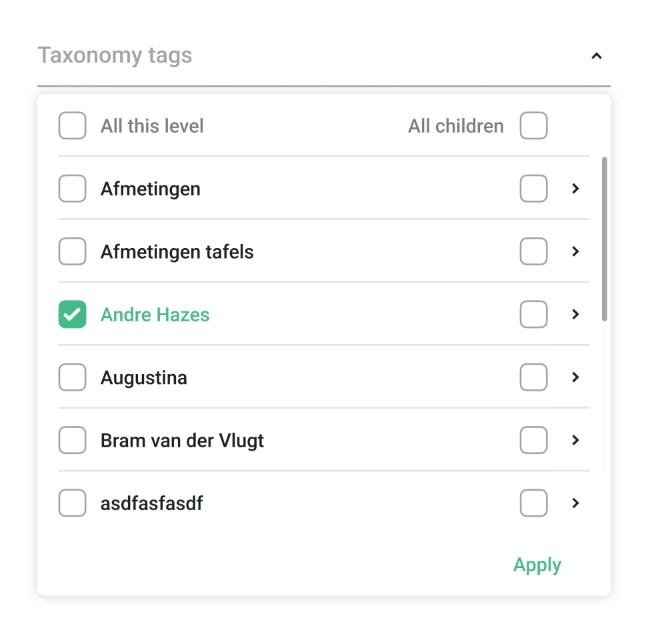
We have updated the Taxonomy tag picker in Catalog to support bulk tag selection, reducing the need to select tags one by one.
- Select all children: select all child tags under a parent tag at once.
- Select all on same level: select all tags that share the same level in the hierarchy.
- Select with children: select a tag together with all its child tags in one action.
- Select all (master): select all tags and their children across the entire taxonomy.
Update GET Products endpointCompleted
We've added the following product data to API V2 to retrieve product details (GET /api/v2/products/{id})
- EventStartDate
- EventEndDate
- Note
Split Key in Combination Price GroupsCompleted
We've added a new setting Sub-group split key to Combination Price Groups. Users can input the key to tell the system which Combination key, if repeated within the same group with different values, should trigger an automatic split into separate pricing calls — reducing users' manual work in setting up groups.
You can find the new setting on Admin UI or via API V2 Combination Price Groups (/api/v2/combinationpricegroups).
AccountOverview Component with Trigger on Shop User Updated and Quotation Contact ChangedCompleted
We integrated the Trigger on Shop user updated and Trigger on Quotation contact changed to AccountOverview component of Account functionality V2. If customers update their information, it will run the flow using Trigger on Shop user updated. In the meantime, if that customer is associated with any quotations, it will run the flow using Trigger on Quotation contact changed.
Ability to Combine Multiple Accounts to a Shop user - Validate Across FeaturesCompleted
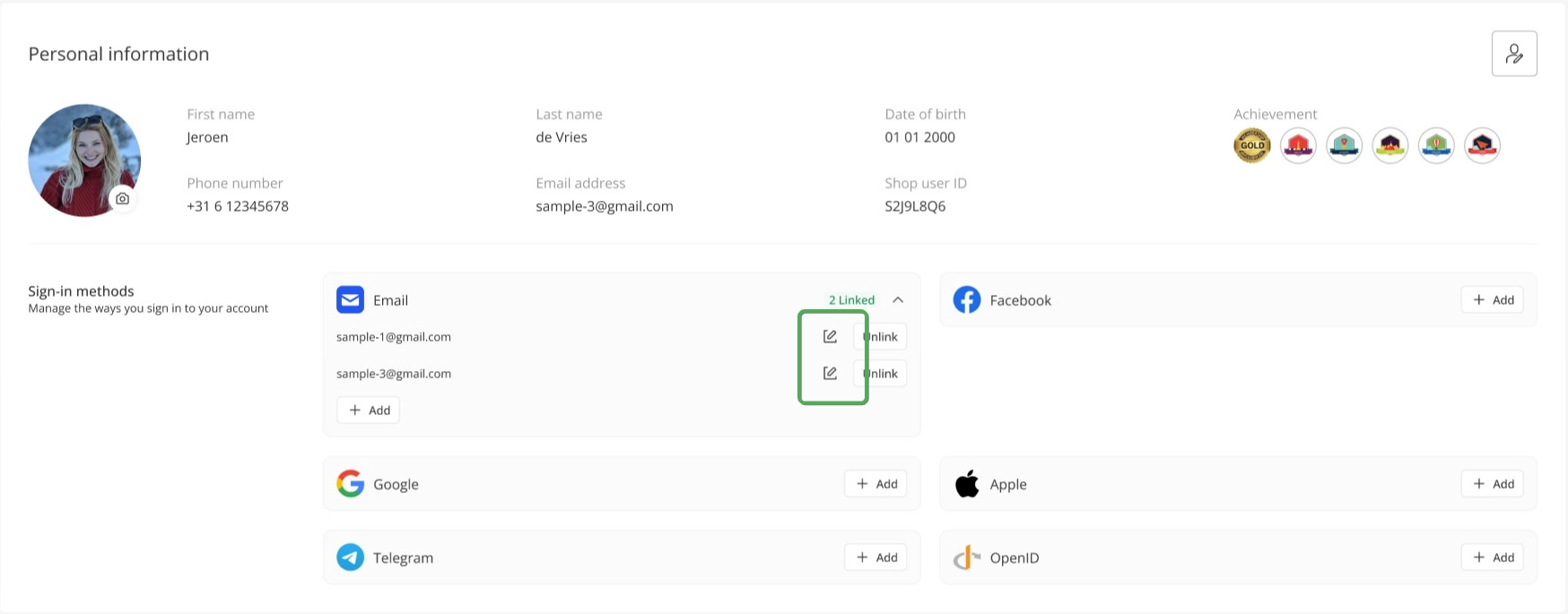
Following the previous release that system allows shop users to manage their sign-in methods on Account functionality, the shop users now have an ability to disconnect the providers from their previous accounts to connect with their new accounts. Therefore, some shop user accounts have no sign-in method and cannot be accessed anymore.
When the account is inaccessible, it will be labelled "Inaccessible" on shop user list and detail page. Admin users can decide how to manage these accounts. This update already included the API shop user endpoint (GET details) update to output type of users, either shop users or guests.
Moreover, we implemented email validation across the Admin site, Account functionality V1 and V2, and the shop user API to prevent the same email address from being linked to more than one account.
We also updated AccountOverview component on Account functionality V2 with the ability to edit your sign-in email address directly. Please note that whether the change goes through depends on the authentication provider.
Note: To enable customers to edit their sign-in email, you need to grant "update:users" permission for oneCORE app on Auth0 setting. Please follow the guideline from Auth0.
Enhance 3D lookalike productsCompleted
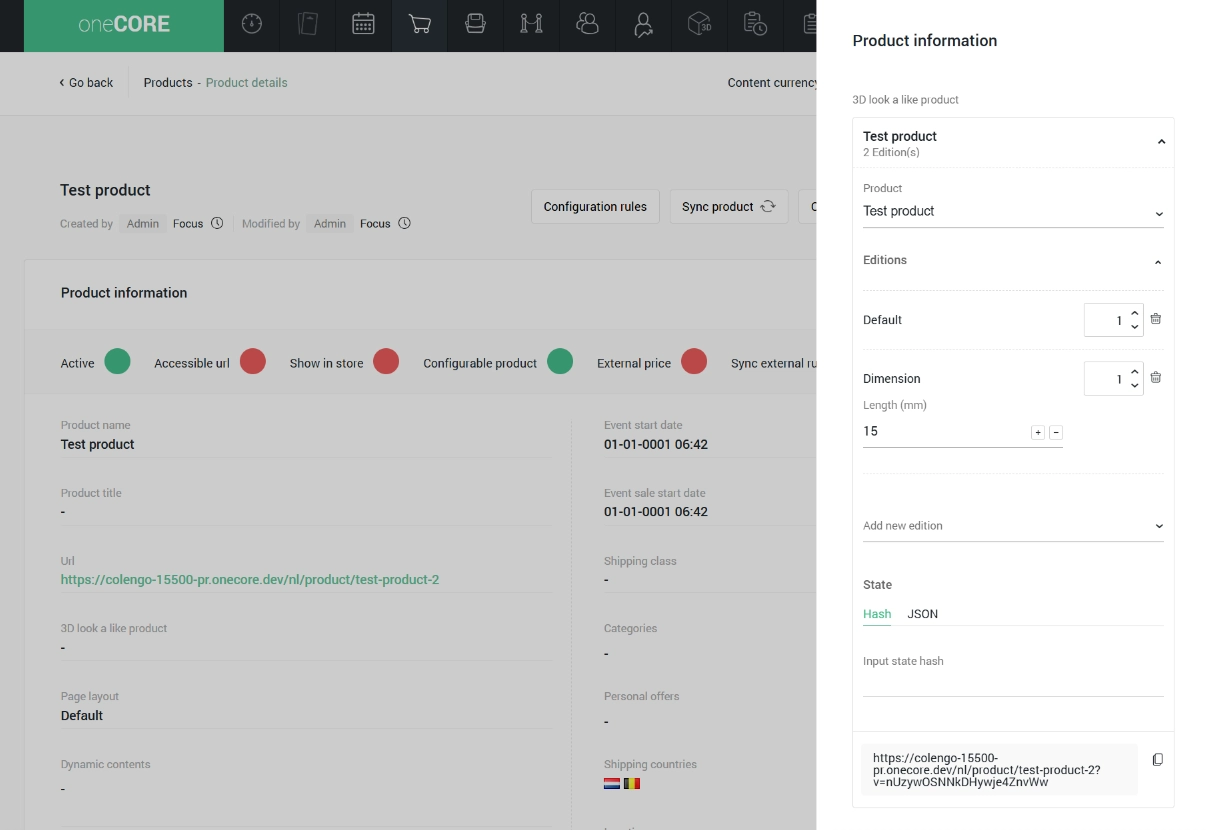
We have enhanced the product and edition selection on 3D look a like product on a product detail to allow users to specify the product with more precise details:
- Users can select product, edition, edition's amount, dimensions, and state.
- After the product is selected, users can enter the configuration's variation string into "Edition" field and system will automatically fill out the editions, edition's amount, dimensions and state based on the variation string.
- Users can specify the configuration's state by hash or manual enter with Json format.
- Users can generate the URL to recheck the configuration before confirming the set-up.
GET ShopUser list + filter by ShopUser's EmailCompleted
We created the API V2 endpoint to retrieve a list of shop users (GET list /api/v2/shopusers). This endpoint also allows users to GET a filtered list by shop user email.
Multi-Server Render SupportCompleted
We are now supporting multiple server renders to process multiple queues in parallel, ensuring that stuck or slow renders don't block the queues and improving overall throughput.
Add Identifier to ProductCombinationPriceCompleted
We've added an Identifier field to the Product Combination Prices endpoint (GET list, POST, PUT and PATCH /api/v2/productcombinationprices) to support dynamic usages. This field is available in the public API only and has no effect on combination prices functionality.
Filter Product by Product Layout and TypeCompleted
We've added Product Layout and Product Type as new filter options on the product list. Product Type introduces three categories — Configurable, Non-configurable, and 3D product — allowing users to filter products by their configuration and asset type. When filtering by layout or type, the product export will reflect only the filtered results.
Note: the 3D product is identified by existence of .gltf and .gltf.xz file.
Bug fixes 13
Broken Menu StylingCompleted
We fixed an issue where the Admin site menu styling would break when a user had all permissions enabled.
Back button on Configuration rules doesn't work correctlyCompleted
We fixed an issue on the Configuration rule feature that clicking at Back or Product details would direct users to other product pages.
Unable to delete unused location via APICompleted
We fixed an issue on API V2 to delete Locations (DELETE /api/v2/locations) that couldn't delete locations though it's not used.
Empty Shop User Export FileCompleted
We fixed the Shop user export file to work normally when exporting the account users.
Fix Product V2 API always returning Active FalseCompleted
We fixed an issue with GET product details (/api/v2/products/{id}) that always output false active status.
Multiple 3D renders on same order itemCompleted
We fixed an issue where an order could sometimes display the wrong 3D render image instead of the one that was actually ordered. Renders are now matched more precisely, so the image shown will always reflect the correct configuration.
Fix Body in ServiceCost Endpoint SwaggerCompleted
We fixed the schema of API V2 Service Cost endpoint that did not match with the actual API output.
Fix Sort Product Function in CategoryCompleted
We fixed the product sorting function on Category manage that did not allow to reorder the products.
Disable Hangfire Job ExternalOneCOREImportJob.ImportDigitalStockCompleted
We disabled the job ExternalOneCOREImportJob.ImportDigitalStock for External oneCORE stock that imports stock from specific provider to only work when the API setting is configured.
Remove AdminUserManagement Permission from Admin NotificationCompleted
We removed AdminUserManagement permission from the ability to view Admin Notification.
Maintenance 12
Remove RawURL from databaseCompleted
We removed unused data from database.
Hangfire recurring failed PurchaseDigitalProductJob.Buy - CTCCompleted
We updated the logic to purchase digital code to stop if a provider returns error at specific case.
Enhance Copy product timeout issueCompleted
We fixed an issue where copying large products would fail due to a timeout, ensuring all products and their information can be copied successfully.
Remove Product Questions featureCompleted
We removed the Product Questions feature, including its admin interface and related permissions. It's no longer available.
Remove Get Return Form on OrderCompleted
We removed "Get return form" function on order details and its related setting and permissions.
Add Modified/ModifiedById Changes for Edition SortingCompleted
We added logging for edition sorting. Whenever the sort order is changed—whether through the Admin interface or via the API—we now record who made the change and when. Timestamps are shown with full date and time, adjusted to your company's configured timezone.
Add New Account section and Customizable Card Style to OrderflowCompleted
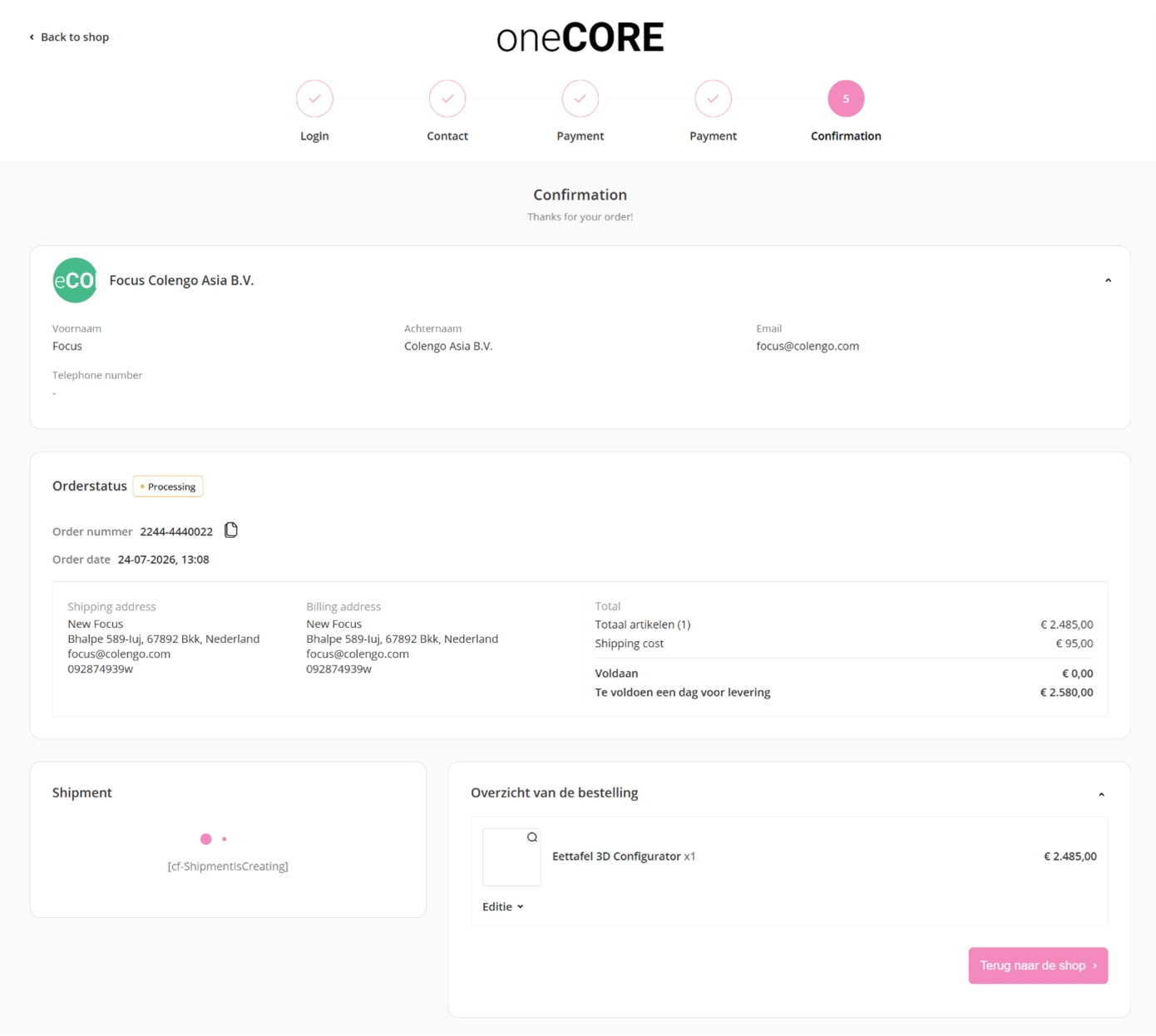
We've added an Account section to Orderflow, visible from the Contact step through to the Confirmation step for logged-in account users. The section displays the account's profile, giving customers a clear view of which account details are being used during checkout. Customers can navigate to their account page directly to update their information.
We also added two new Orderflow appearance settings — Card Border Radius (0–12, default None is for original radius) and Card Border Style (border and shadow, default shadow is for original style) — giving tenants more control over the look of Orderflow display. These 2 settings can be configured in Company setting > Orderflow settings.
Remove ProductId from Order - DatabaseCompleted
We've removed the ProductId in Order table completely from the database.