
oneCORE roadmap
August 2026
New features 9
Custom Product Feed Per Theme or ShopCompleted
Each tenant can now create and manage custom product feeds per shop or per theme. The custom product feeds allow you to customize the data in feed dynamically. When the custom feed types are created by the Client Success team, they will show up alongside the existing "Based on feed" options.
Add Address to Dynamic Form and Support on Account Function V2 and OrderflowCompleted
The "Address" field lets you store additional address details that don't fit into standard address fields — like a building name or a house number with a suffix (e.g. "240-55 1/3" or "470 A"). It was previously available only via the API and viewable on Order/Shop user detail pages in Admin.
We've now extended support for this field to dynamic forms — Physical Product Address & Physical and Digital products & Ticket Product & Shop User Address, so it appears consistently across Orderflow, Account functionality V2 MyAddress component, and Admin — including shop user and order address details which allows to edit.
Besides, new setting "Identifier" in dynamic form is added, in order to reuse same form layouts in multiple places.
Add Shipping Method Name and Create endpoint to GET Shipping MethodCompleted
We added a "Name" field for shipping methods. The current multilingual "Name" field on Shipping method will be renamed to "Title". System will automatically set up the Shipping method's name, using Title from default language. This name is now used consistently across Admin, and a new API endpoint is available to retrieve shipping method details (/api/v2/shippingmethods).
Auth0 Passwordless AuthenticationCompleted
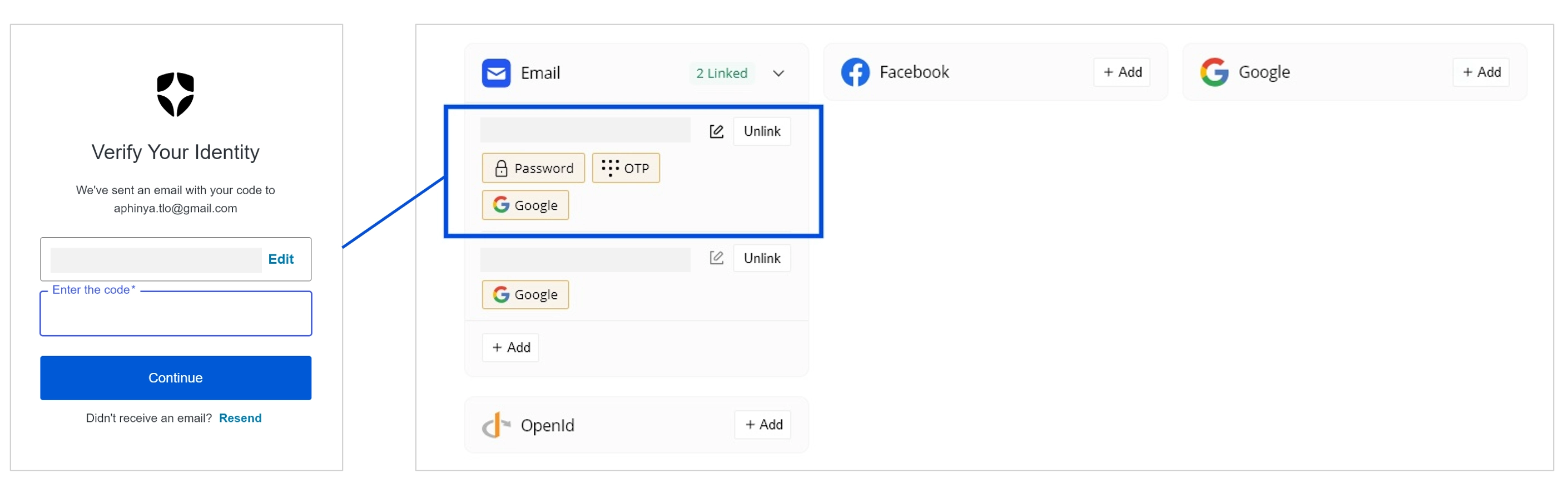
We've added the option for Email-Based Passwordless Auth0 login. When enabled for your shop, customers can sign up and log in using just their email address — no password required. They'll receive a one-time code by email to confirm their identity before successful access as existing shop user.
Please enable the Auth0 Passwordless Authentication with email first before activating it on oneCORE. Refer to this document Passwordless Authentication with Email - Auth0 Docs.
Auth0 Settings
- Setup "Application → Connections" → enable passwordless
- Setup "Authentication Profile" → choose Identifier first to support password authenticate and passwordless
- [Optional] Authenticattion → Passwordless → click configure on email → adjust OTP expiry and length
- "Disable Sign Ups" should off
Each tenant can enable this Auth0 Sign-in method for a shop in the API setting of Auth, changing the "Bool1" to Yes if you would like to enable the Email-Based Passwordless.
After being configured on both oneCORE side and Auth0 side, customers can sign up and log in with just their email address — no password is set or required.
After successful sign-in with OTP, system will correspond differently based on how previous shop user account is created.
- If previously sign in with password, OTP will automatically be added as additional sign-in method.
- If previously sign in with social account via Auth0 (depending on each tenant's configuration), shop user must undergo the email validation to verify their identity before proceeding to sign in as, link to or change email.
Unlink email will unlink all sign-in methods using the same email — Password, OTP and Social login.
New translation keys are added along with default translation for all languages in use, please see Account Functionality V2
ReferenceCode field in Quotation ProductCompleted
We've added a ReferenceCode field to quotation products. This optional field accepts a string value of up to 50 characters and can be used to store an identifier for each product line on a quotation for tracking and reference purpose. It is available via the quotation product endpoint (/api/v2/quotations/{id}/products) on POST, PUT, and PATCH, and is returned in the quotation details endpoint (/api/v2/quotations/{id}). When the ReferenceCode is updated via Public API, it will also fire the Trigger on quotation product changed.
Please note that this field is not supported in an order.
API V2 Endpoint to GET Order ListCompleted
We've added a new public API endpoint to retrieve a list of orders (/api/v2/orders). The endpoint supports filtering by start date and time.
Update Endpoint to GET Order DetailsCompleted
We've updated the order details endpoint (/api/v2/orders/{id}) to include Edition ID and Ticket Design ID on each ticket item.
Configuration Rule UI Update and GroupsCompleted
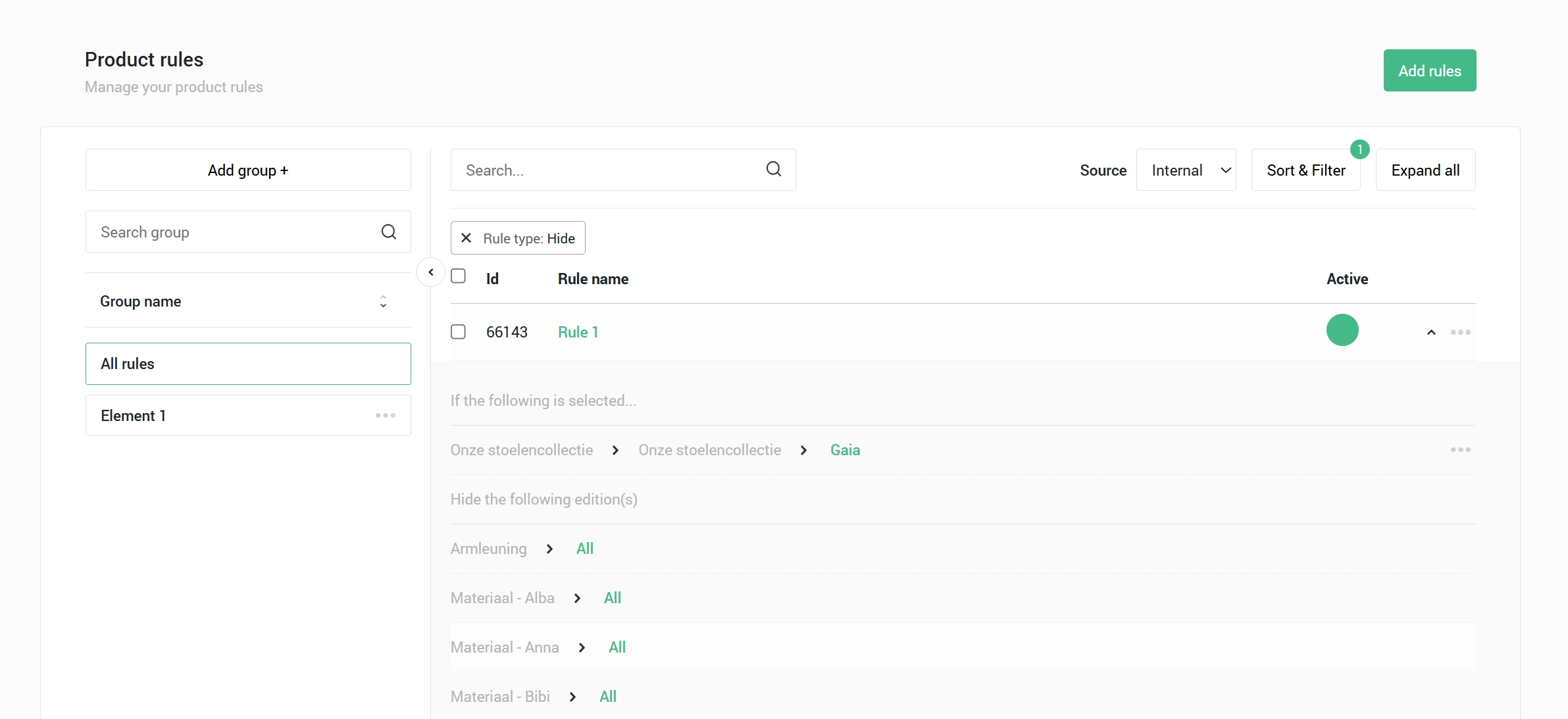
Keep your rules organized and easy to find. You can now group configuration rules into Groups, making it easier to manage your workspace no matter how many rules you have. The Group function doesn't affect configuration rule function on configurator.
- Create and name groups — organize rules into custom named folders.
- Move rules between groups — move single or multiple rules to a different group at once.
- Default group — all rules remain accessible under "All rules" as an overview.
- Search and sort — search groups by name and sort alphabetically A–Z or Z–A.
- Copy and sync rule — rules and their group assignments are copied and synced within catalog product.
- Copy product — rules and their group assignments are copied along with the product, within and across companies.
Add Rule to Select > Allow other options to Supprot If - any - of the following is selectedCompleted
We've added a new condition option — If any of the following is selected — to the Select > Allow other options rule type. This gives more flexibility when defining when alternative options should be made available to customers.
Bug fixes 16
Update Default Timeout for 3D RendersCompleted
We increased the default timeout of the 3D renders to support longer processing time. Besides, the reserved amount for multi-render is updated to 1 queue. Also, we added the support to handle the 404 error due to broken 3D models that the render will retry 3 times and skip.
Handle Error 000 on OrderflowCompleted
We fixed an issue where customers who experienced an interruption during checkout would land on an Error 000 page instead of resuming their order. This could happen when customers switch away from the browser mid-checkout or there is an internet connection interruption.
The fix ensures that, if there is an interruption, the system retrieves their existing active order and customers will resume the current checkout process without experiencing any error.
Please note that this fix applies to short interruptions only. When the interruption was longer than 20 seconds for the server to resume the process, customers will be directed to an Error 001 page, indicating that the connection could not be restored. In this case, customers will need to retry or restart the checkout process.
Update Email Validation Flow to Check with Only Account Pass First LoginCompleted
We fixed an issue in the email validation flow: previously, if a customer's account hadn't completed first login, their unfinished account could incorrectly block themselves from registering with the same email via new sign-in methods — without giving them the option to link account or sign in to old account.
Now, an incomplete account no longer blocks new registrations. The accounts whose email passed the validation first can take that email, while another account will be presented the options how to continue with their account to prevent the same email to exist with multiple accounts.
Concurrent Order Creation Issue in Shopping CartCompleted
We fixed an issue where refreshing the page during order creation could result in multiple identical orders being placed within seconds. The fix ensures that only one order is created per checkout attempt and customers can continue with existing order if customers refresh mid-process.
Shipping class - Name change failedCompleted
We fixed the issue where Shipping class couldn't be modified.
API Settings Pagination BugCompleted
We fixed a pagination issue that did not allow to navigate to the next page.
Fix Selected Tags Not Applied on First Click After Search ChildCompleted
We fixed a bug on Taxonomy tag picker on Catalog where selecting a child tag through search and clicking "Apply" wouldn't save it on the first try — it previously required doing it twice. Tags now save correctly on the first attempt.
Force Email Re-Login After LogoutCompleted
We fixed an issue with Email sign-in method where logging out did not fully clear the session, causing customers to be automatically signed back in as their previous account without being prompted to re-enter their credentials. Customers are now always required to log in again after logging out, across email validation, the menu login, and the Account Overview.
Timeout While Loading EditionCompleted
We fixed an issue where products with a large number of editions — typically in the thousands — would time out when loading in Admin. This fix reduces the processing time, ensuring products with a high edition count load successfully.
Support Shared Component on API V2 PagePageComponentsCompleted
We fixed an issue where updating a shared component on one page via the PagePageComponents API (PATCH /api/v2/pages/{page_id}/pagepagecomponents/{id}) would unintentionally apply the change to all other pages using the same shared component. Updates are now scoped to the specified page only, leaving all other pages unaffected.
Fix MyVoucher to Update Status ImmediatelyCompleted
We've fixed the claim button on MyVouchers component that does not correspond immediately after being claimed.
Account V2 - MyOrders Component Not Showing OrdersCompleted
We fixed an issue where the MyOrders component in Account Functionality V2 was not displaying orders for some customers due to an incompatibility with older order data.
Account Option Auth0 Login Not Center AlignCompleted
We fixed a display issue where the Auth0 login option was not centre-aligned on the account page and the first-login page. The company name field on the Auth0 login option was also not populated, and has now been corrected.
"Show Achievement to User" Affect Account Functionality Page VisibilityCompleted
We fixed an issue where the Show achievement to user setting was incorrectly controlling the visibility of Account V2 pages associated with that achievement. This setting is intended only to control whether the achievement itself is shown to the customer — it should not affect access to any linked pages. Pages with achievement-based visibility conditions now behave correctly regardless of this setting.
Media - Image URL Delay Update VersionCompleted
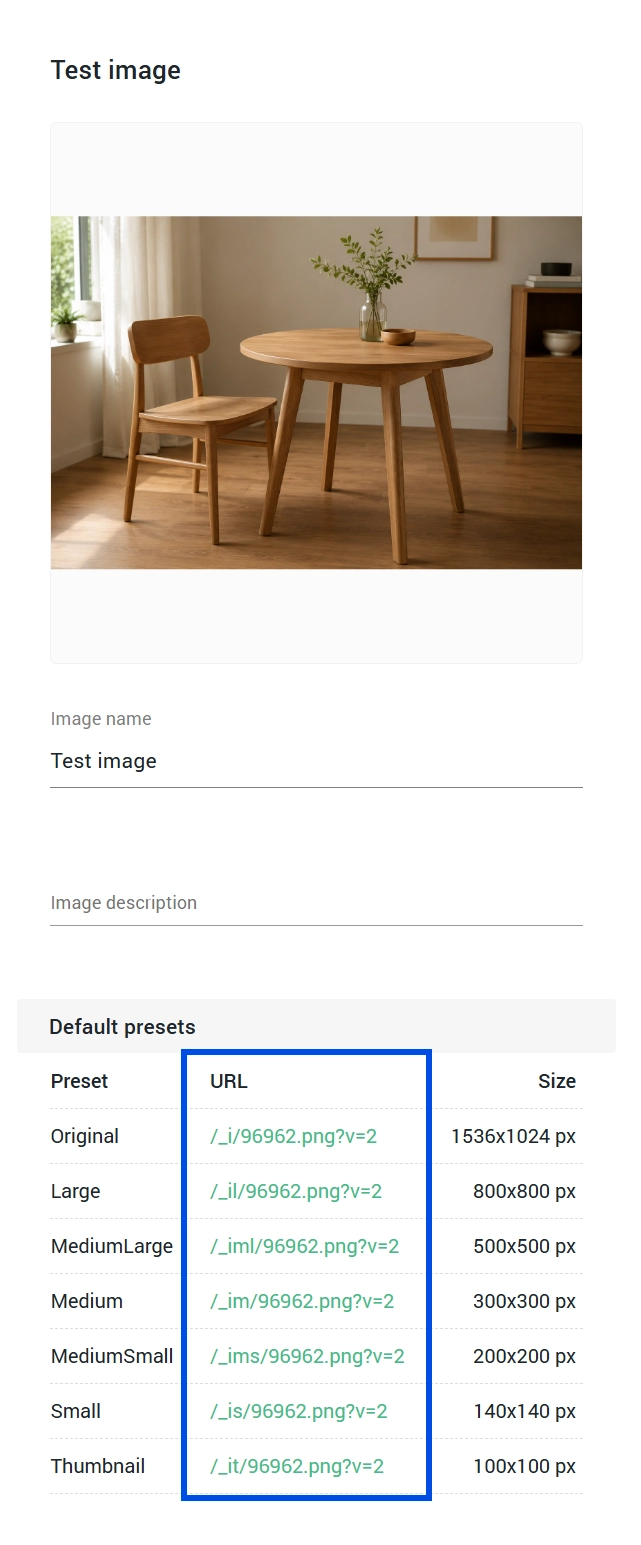
We fixed an issue where replacing an image in the Media library did not immediately update the image URL version, causing the old image to continue appearing.
The image URL version is now updated as soon as an import of new image is confirmed, ensuring the latest image is served without delay.
Maintenance 7
Move GA4 Purchase and First Time Paid Event to OrderflowCompleted
We've moved the GA4 purchase tracking event and first time paid tracking event (custom event) to fire from the client-side directly. The condition when to fire the purchase event and first time paid event remains unchanged — it still triggers once, right after a successful order confirmation either from accessing on via direct Orderflow or order URL, and never for test orders placed while an admin is logged in.
As part of this update, we also removed Hubspot, Twitter, tracking from Admin and oneCORE and Facebook tracking from the Orderflow, but the setting on admin remains.
Change Name from "Screenshot" to "Render"Completed
Due to the revised terms of Screenshot service to Render service, we've renamed "Screenshot model" and "Screenshot angles" to "Render model" and "Render angles".
Add External to GET list and Detail Product RulesCompleted
We've updated the GET list and detail endpoints for product configuration rules to include an External field, indicating whether each rule is internal or external. This allows integrations to identify and manage externally created rules, such as those synced from an ERP system, without ambiguity.
Update Orderflow and Account V2 to Use Case-Insensitive KeysCompleted
Orderflow V2 and Account V2 have been updated to retrieve translation keys in a case-insensitive manner, for example, if the key Ac-back is required, it uses translation from ac-Back.