
oneCORE roadmap
September 2026
New features 12
Implement Master ProductsCompleted
We supported Master Product — a master template of product you can configure once and use to quickly create products from, instead of setting each product up from scratch. In this first phase, admins can create and configure Master Products, and manage them through a new List and Detail page in the Admin. Read how to create and configure Master product.
Coming up next, we'll add rules to Master Products so that settings can be applied automatically when products are created, along with the ability to manage Master Products via Public API.
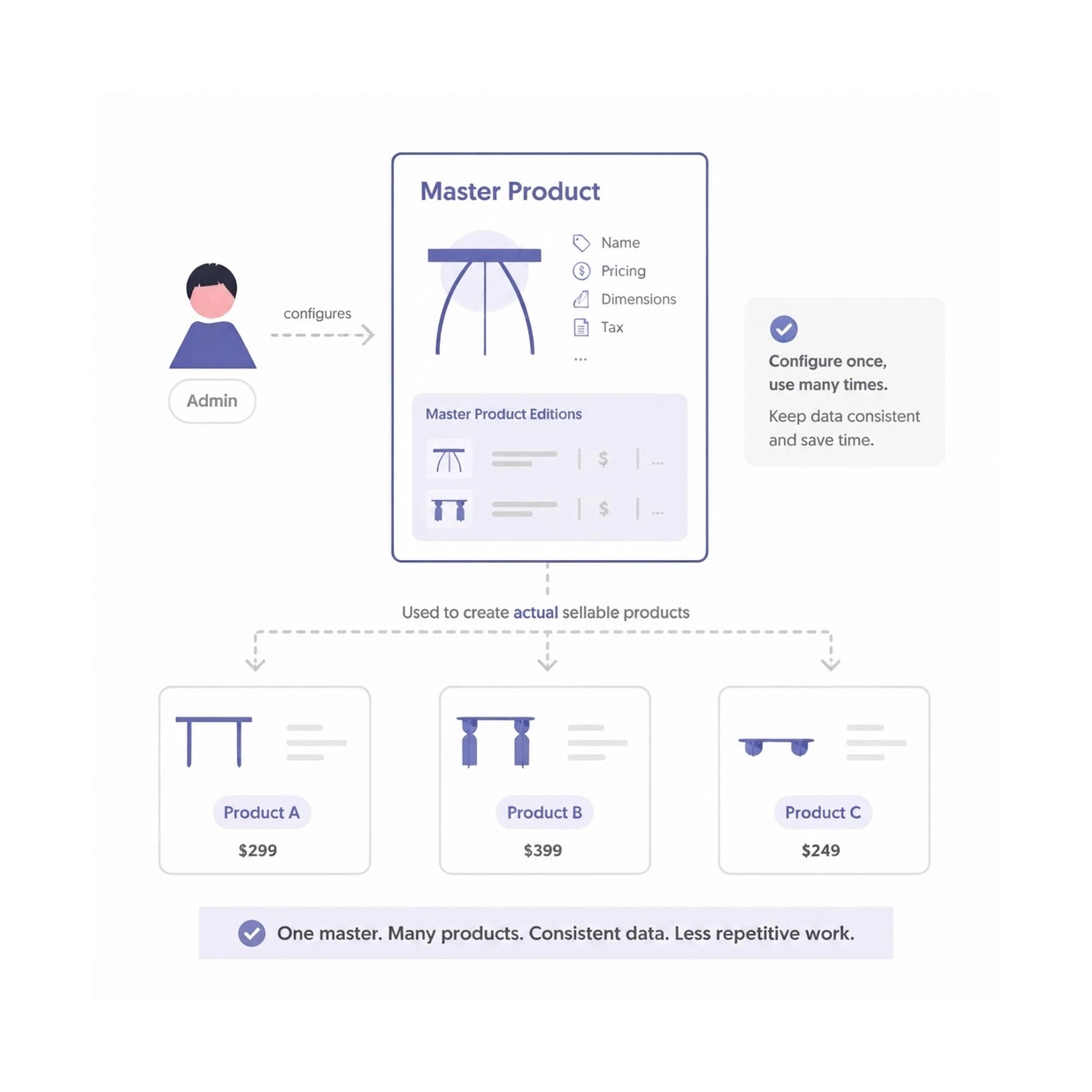
Image Focal Point in Component Editor - Soft launchCompleted
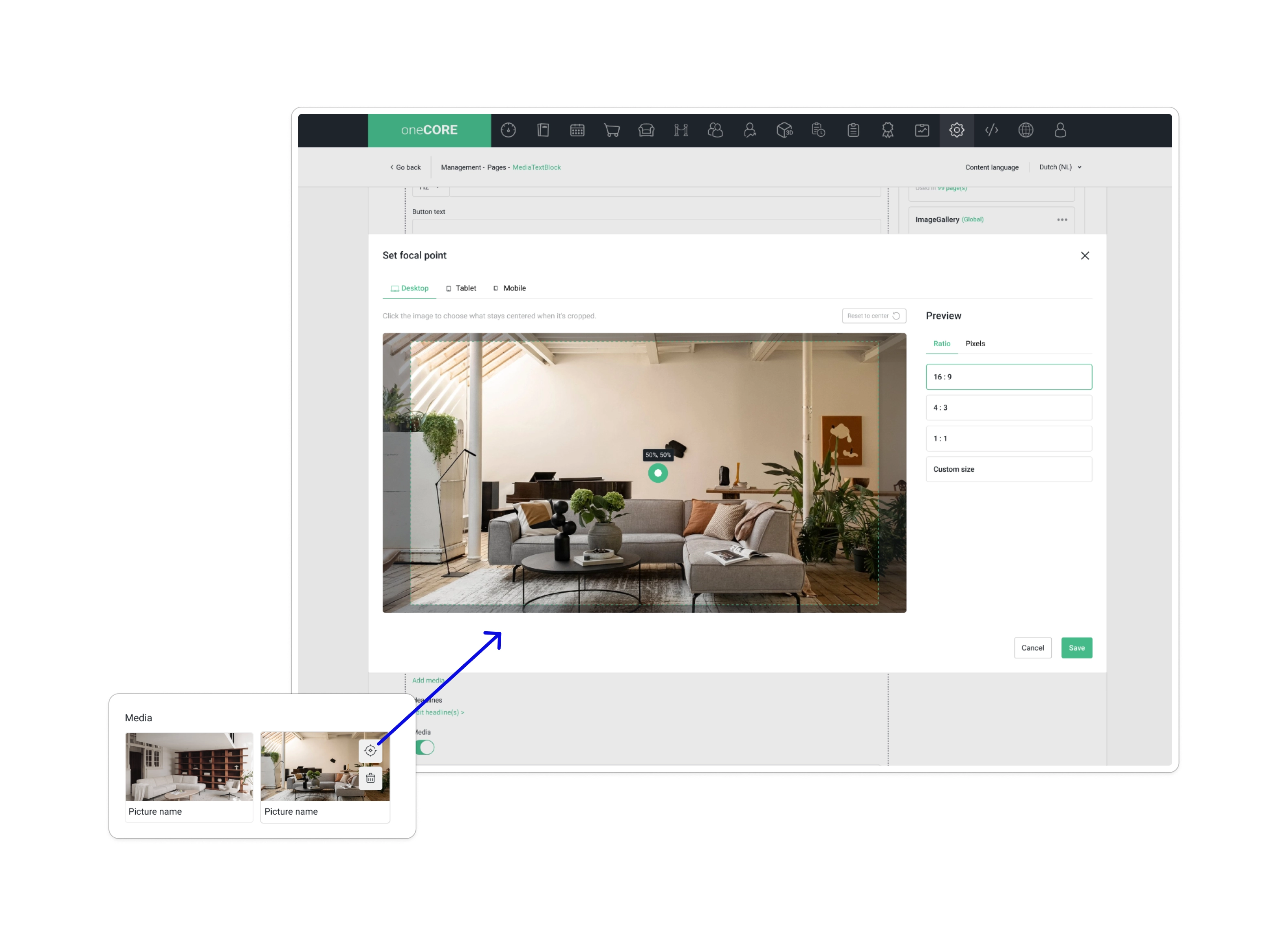
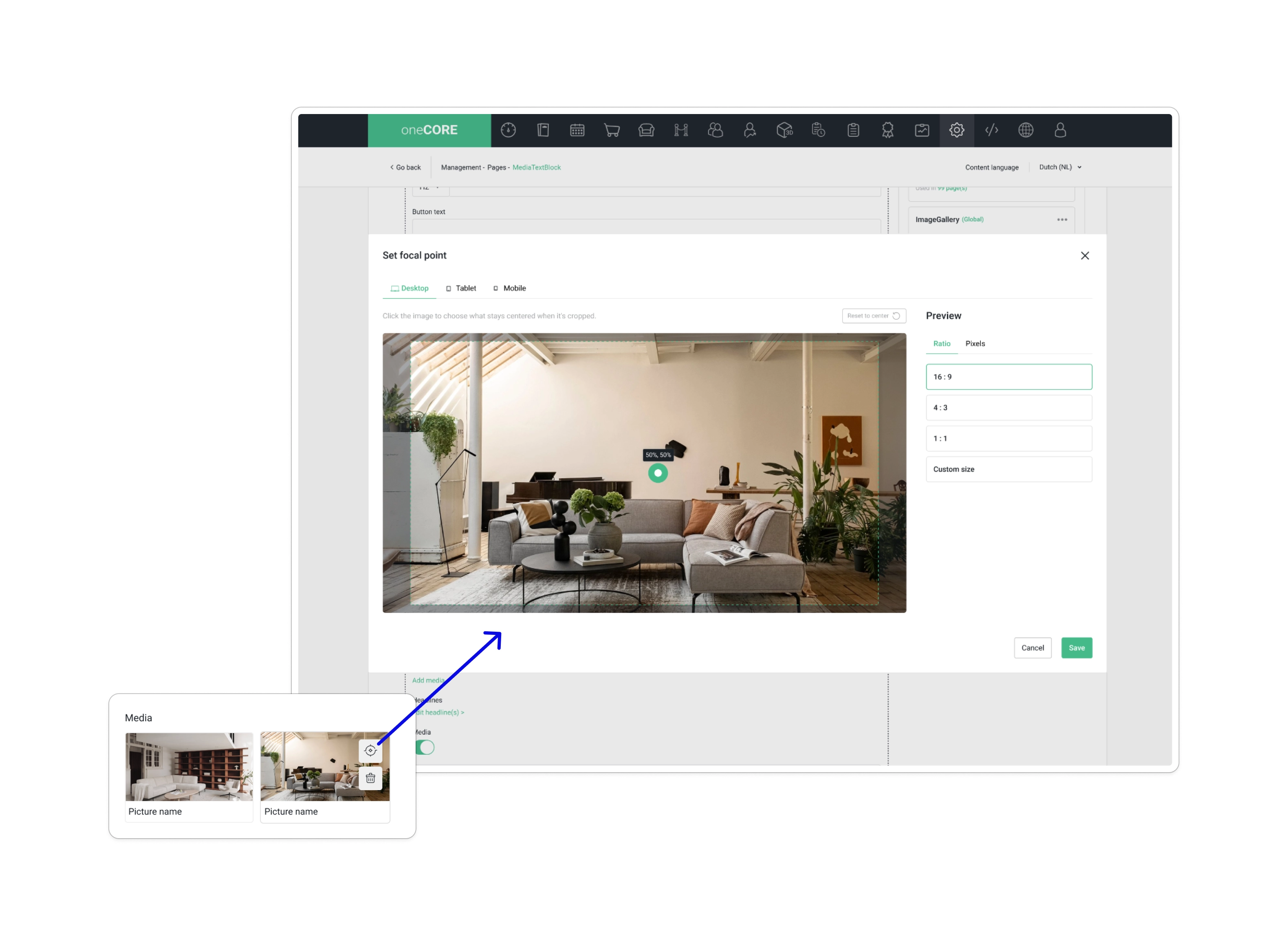
Keep the important part of an image in view, no matter what size it's shown at.
Please note: this is a soft launch — the feature is not yet fully ready and will be officially completed and released on 28 September 2026.
Add New 3D Render SizesCompleted
New 3D render size ExtraLarge is now available (1280 x 1280). These following API endpoints are updated to output 3D render ExtraLarge size:
- GET Quotation details (/api/v2/quotations/{id})
- GET Order item list (/api/v2/orders/{id}/items)
- GET Render 3D details (/api/v2/render3D/{id})
Disable Guest Checkout FeatureCompleted
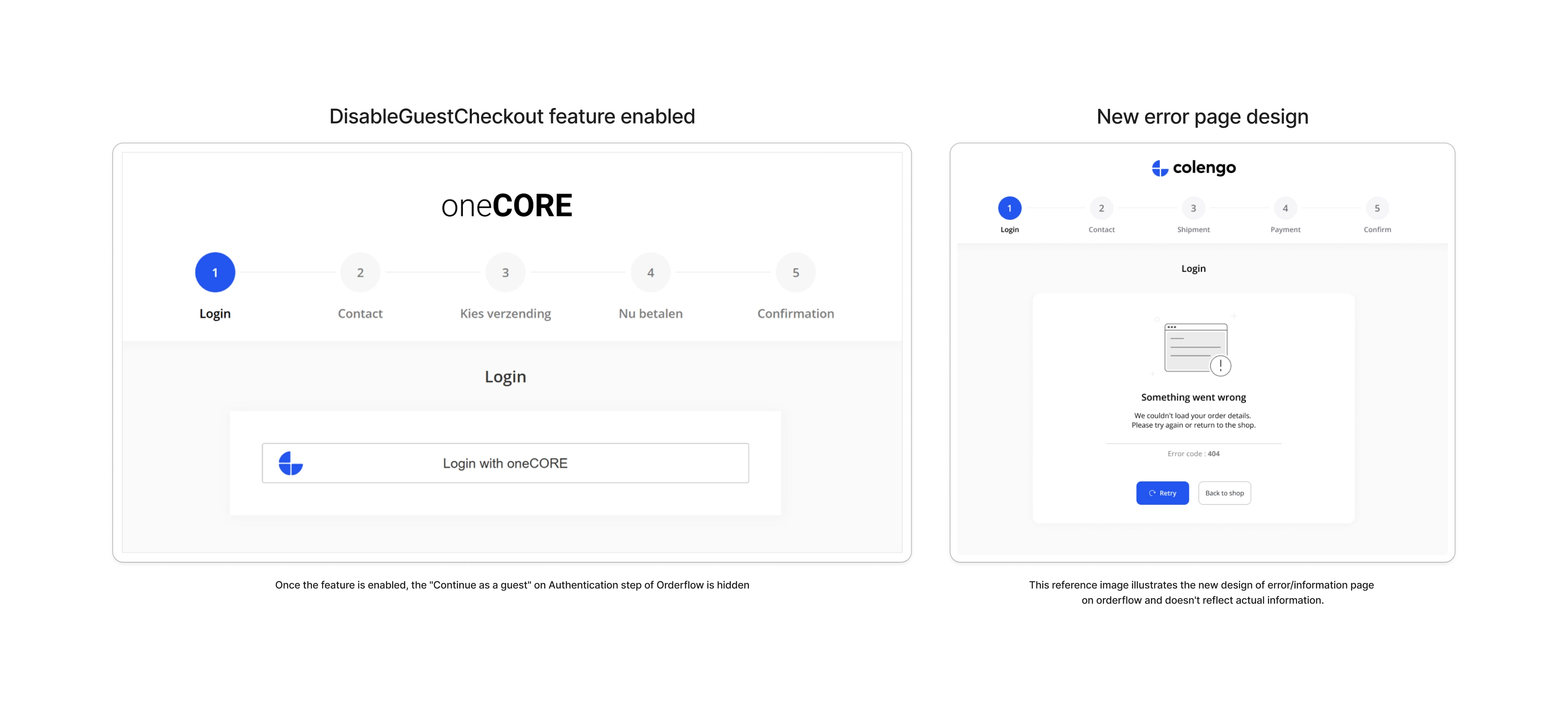
We've added a setting DisableGuestCheckout to require an account at orderflow. Each tenant can enable the feature at Company Setting > Orderflow feature. Once the feature is enabled, the "Continue as a guest" on Authentication step of Orderflow is hidden, ensuring every customer has to sign in or sign up before they can complete a purchase.
The feature is compatible with SkipAuthenticationStep where Authentication step is normally skipped in this mode. When both SkipAuthenticationStep and DisableGuestCheckout are enabled, guest customers will be redirected to the Orderflow information page (code 300) once they proceed to checkout, explicitly indicating that sign up or sign in is required to place an order.
New translation keys are added:
- cf-ErrorPageTitle
- cf-InstructionPageTitle
- cf-InstructionCode
- cf-LoginRequired
- cf-LoginRequiredMessage
- cf-Instruction
Along with this update, we have implemented the new design of the error/information page of orderflow.
Attachment Field Type in Product Quotation FormCompleted
We've added Attachment as a new field type in the Product Quotation form type's Available Fields list. Once added to a Product Quotation form, customers can upload a supporting file directly with their request. You can set the Placeholder text and toggle the field as Required; the Label is fixed and shows "qp-FileUpload."
Please note that the front-end integration is required to display this field in a request quotation form.
Display Dynamic Data Field in Quotation UICompleted
We've added the Dynamic Data field to the quotation detail page in oneCORE, so information submitted with a request is visible directly on the quotation.
Dynamic Forms - Support Spaces and Symbols in Dropdown Option ValuesCompleted
We've fixed an input field of dropdown options in Product quotation form type to accept spaces and symbols.
Image Focal Point in Component EditorCompleted
Keep the important part of an image in view, no matter what size it's shown at. You can now set a focal point on images used in components, giving you control over which part of the image stays in focus when it is cropped or resized across different screen sizes. The focal point can be configured separately per device — Desktop, Tablet, and Mobile — directly from the media selection in the Component Editor, with a preview frame per device to visualize the result. The focal point will also be carried over when you sync image across languages and copy component or page.
Please note that the feature must be enabled by front-end developers on each component first before a focal point will be available to set up.
Netherlands Address Auto-fill in OrderflowCompleted
We've integrated with a postcode lookup service to support address auto-fill for Netherlands addresses. When configured in your API settings (details provided below), entering a postcode and house number in Orderflow will automatically fill in the street name and city. If the auto-filled data is modified manually, a warning is shown but the customer can continue with their manual input. In this regard, we have added 2 new translation keys:
- cf-MismatchStreetName
- cf-MismatchCity
Please note that oneCORE provides the integration only. The postcode lookup service is provided as-is by the service provider, and data accuracy, availability, and speed are subject to the provider's own conditions. Any costs or charges associated with the service are outside of oneCORE's scope.
API setting
- Type: Postcodetech
- APISecret1: API key provided by the service
Shop User Family - Available to Manage by AdminCompleted
Customers can now form a family group in oneCORE through the new Shop User Family feature, linking accounts of members who belong to the same group. Customers can share relevant account content with the people in the same family, while tenants can map the full customer journey across family members.
In this first phase, family management is handled by Admin. Admins can create families, assign and remove members, transfer ownership. To access and manage the Shop user family feature, users are required ShopUserFamily permission. Once the permission is granted, the feature will be available under Shop user menu. A public API to manage the families is also available for tenant admins to manage families programmatically.
Besides, Admin can configure which Account Connect pages and components as shared for everyone or shared within a family only by the new page and component setting "Accessible". Members of the same family will see the same shared content on their Account Connect page (Account functionality). The shared content is based on each tenant's usages and implementation.
Please note that the shared content configuration will be handled by each tenant. In the next release, oneCORE would provide the Account Connect component that allows customers to form and manage their own family directly.
Display Product ID on list pageCompleted
The product ID is now displayed on the product list page in Admin. Once the ID is clicked, it will open the product detail page.
Add Helper Text to Product Configuration PickerCompleted
We've added helper text to the configuration picker fields in the 3D look-alike setup, Component Editor, and Product image picker, making it clearer what each field expects — particularly the Edition (variant) and Hash fields used in 3D configurations.
Bug fixes 9
Trigger on Order Status Changed Fired Multiple TimesCompleted
We fixed an issue where the trigger for Order Status Changed could fire more than once for the same order, sending duplicate notifications with identical order details. This happened because the checkout process would occasionally retry in the background after a slow response, and that retry queued an extra trigger even though the order's status hadn't actually changed. The trigger now fires only when an order's status has genuinely changed.
Unable to Select Currency on AccountPreferenceCompleted
We fixed an issue on AccountPreference that couldn't change currency.
Orderflow Keeps Guest Users After LoginCompleted
We've fixed an issue in Orderflow where, if a customer started checkout as a guest and then went back to a shop to sign in before completing the order, the order could still be recorded under the guest account instead of their signed-in account.
Achievement - "Last modified by" user field is incorrect when editing achievement infoCompleted
We've fixed the "last modified by" field on Achievements, which previously showed the wrong user after an edit even though the modified timestamp itself was correct.
Focus Rule Name on Add Rule SidebarCompleted
We've updated the Add Rule sidebar so the cursor is automatically placed in the Name field when you open it, letting you start typing right away without an extra click. The Rule group dropdown has moved below the Name field to make room for this.
Account Connect - Text Wrapping Issue When Content Contains Links in Content ComponentCompleted
We fixed a display issue where content containing a link could break the link onto its own line instead of keeping it within the sentence. Links written into your content now flow inline as expected.
Not Create Duplicate Transaction With the Same Payment Provider and MethodCompleted
We've fixed an issue where refreshing the page immediately after proceeding to complete transaction (after selecting a payment method) could create a duplicate transaction for the same order, payment provider, and payment method.
Fix Orderflow Not Save SubscriptionCompleted
We fixed an issue where newsletter subscription data entered during Orderflow was not being saved in oneCORE. Please note that the ActiveCampaign integration remained functional throughout this period.
Export Orders When Filtered by Email Output All OrdersCompleted
We fixed two issues with the order export function:
- Filtering by customer email now exports only the orders associated with that email address, rather than all orders.
- Filtering by order total price now correctly filters by total price rather than sell price.
Maintenance 8
Remove and Clean up Account functionality V1Completed
We've enabled the Account functionality V2 for all tenants — Account V1 is now fully retired. The Account V2 will be using /account URL instead. AccountV2 permission is removed and Account page management becomes visible for all admin users. The "Account" page management is now changed to a page management for Account functionality V2. Some of Account features to enable/disable the Account V1 page is Company settings are now removed, remaining feature is TelephoneNumberVerification.
Besides, we updated API V2 Pages endpoint (POST, PUT, PATCH /api/v2/pages) to support Account V2 page type and discontinue the support for Account V1.
Remove Dragular from Admin (4)Completed
We've removed the Dragular package from Admin as part of an ongoing effort to reduce external dependencies.
Remove Assign Seats from TicketsCompleted
Assign Seats has been removed from Ticket product type and is no longer supported on the platform. This removal won't affect your existing products or orders.
Switch Default API Swagger to V2Completed
The API Swagger page (/api-swagger) now defaults to API V2. A deprecation notice has also been added to the V1 section informing users that API V1 is no longer under active development and directing them to use API V2.
Handle Unusual Quotation Request BehaviorCompleted
We've strengthened the security of the quotation request flow to better handle unusual and potentially abusive requests. Suspicious requests are now silently discarded and will not be recorded in the system. We've also introduced feature flags to control which quotation actions are permitted per tenant, preventing unsupported actions from being performed on tenants where they are not intended. These feature flags will be reviewed and enabled by a project manager responsible for your oneCORE tenant.
Clean Up Old Code and Migration for Combination Price MigrationCompleted
We've completed the cleanup of legacy code and database columns related to the Edition metadata and External price metadata migration to Combination Price. This is an internal maintenance update with no change to pricing behaviour for tenants.