
oneCORE roadmap
October 2026
New features 9
Shop User FamilyCompleted
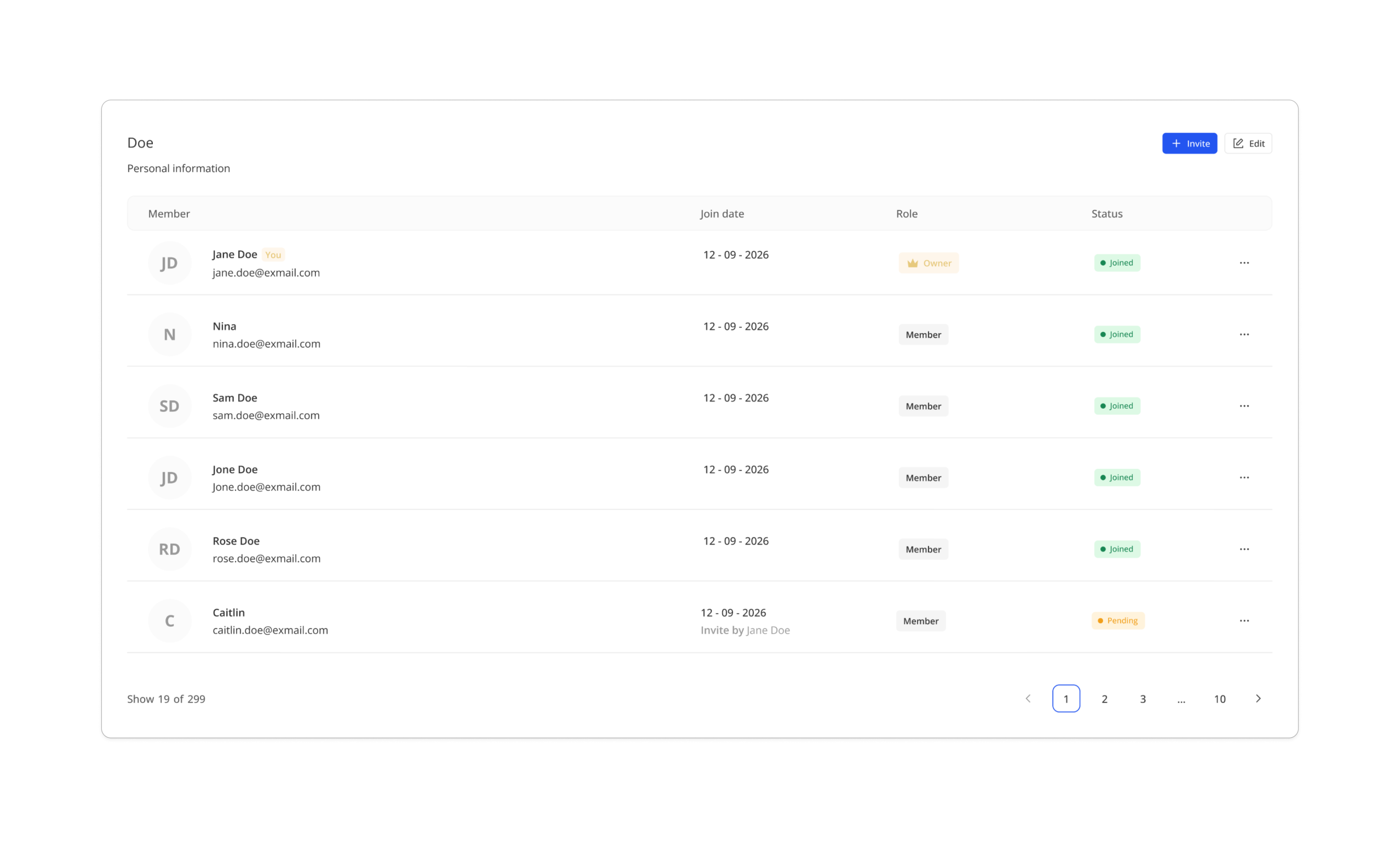
Customers can now manage their own family directly from Account Connect, through the new MyFamily component. This is the second phase of the Shop User Family feature, giving customers full control without Admin involvement.
From the MyFamily component, customers can invite others to join their household, accept invitations, transfer ownership, remove members, and leave the household. Invitations are sent by email and expire after 30 days. Once a customer joins a household, they will see shared content on Account Connect pages and components configured as family-accessible by the tenant.
To enable this feature, set up the MyFamily component on your Account Connect page and configure the invitation email with notification template feature using the Shop user family invitation mail type.
Read more about this feature > Shop user family
Master Product RulesCompleted
You can now create and manage configuration rules for Master Product, allowing rules to be shared across all editions linked to the same master product. This reduces the time and effort needed to set up and maintain rules individually on each product.
The master product rule supports all rule types — Hide, Select, Disable, and Dimension restriction — with the same settings available as product-level rules. Rules can be organised into groups, moved between groups, copied within a master product, and filtered by rule type, condition edition, and affected edition.
Note: as the current phase doesn't support creating product from master product yet, sync rule function is not provided.
Dynamic Subscription Field on OrderflowCompleted
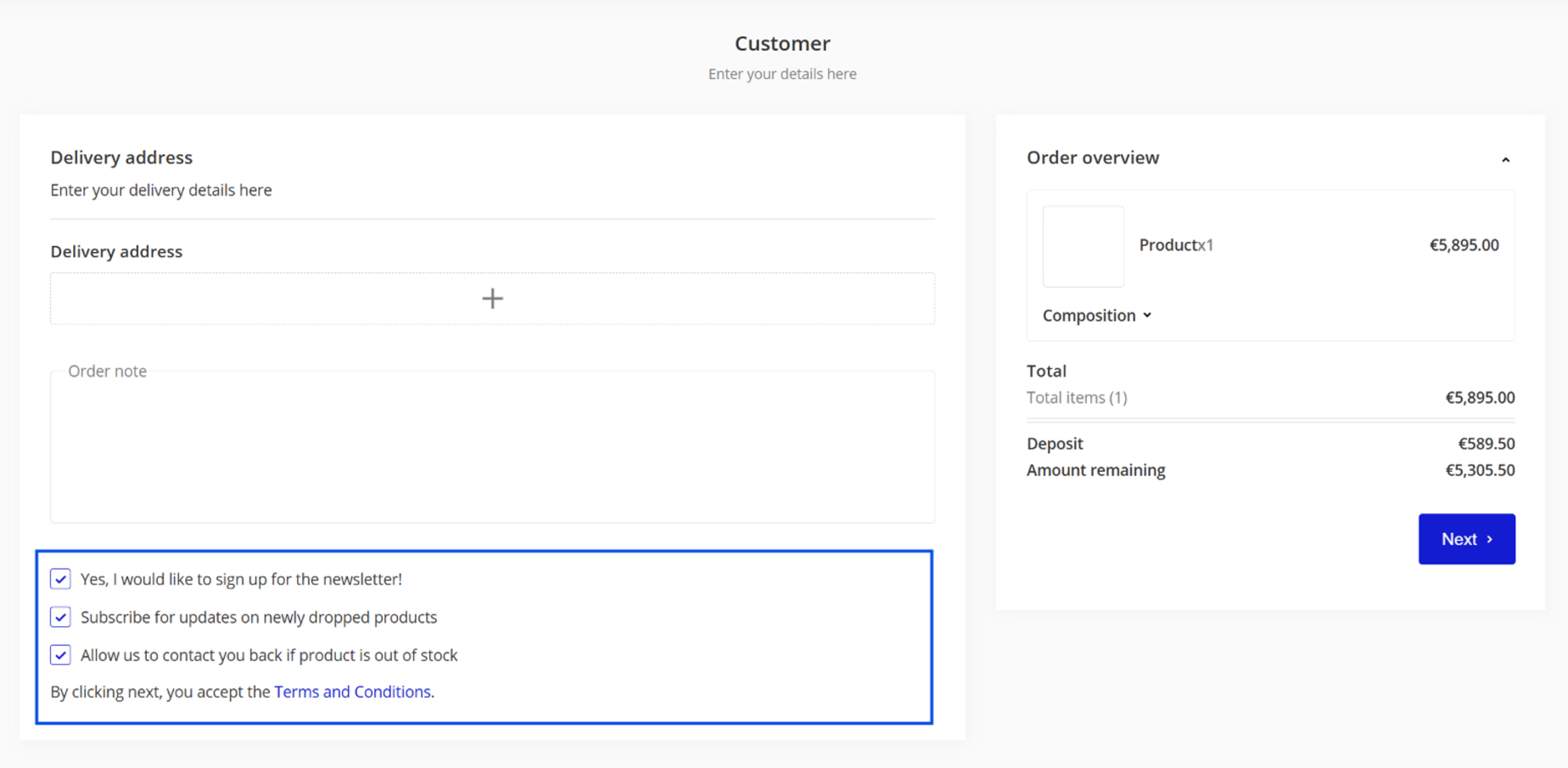
We're now providing dynamic newsletter subscriptions in Orderflow which is no longer tied to ActiveCampaign. Tenants can configure multiple subscription checkboxes in the Orderflow address form, enabling the ability to connect the subscription on orderflow to several marketing providers.
- To configure the newsletter, admin must navigate to Settings under Shop user menu. Create a newsletter which represents each subscription purpose.
- After that, admin must configure the Extra Order field form type by adding the dynamic newsletter subscriptions field to the form.
- Once configured, the orderflow will display all available subscription you have configured as a checkbox.
Once the subscription is saved, it persists across future orders — customers do not need to re-subscribe each time.
Create Trigger on Achievement UpdatedCompleted
A new trigger — Trigger on Achievement Updated — is now available under the Shop user trigger type. It fires when:
- an achievement is assigned either by Admin user or system
- an achievement is unassigned either by Admin user or system
Soft Delete Product Rule via Public APICompleted
Product configuration rules can now be soft-deleted via the public API by passing parameter (?softdeletedids) on the existing endpoint (DELETE /api/v2/products/{id}/rules). Soft-deleted rules no longer appear in the rule list or in Admin and are no longer applied to the configuration. However, their details remain accessible via the rule detail endpoint for audit and recovery purposes. Once the soft-deleted rules are no longer needed, it can be deleted permanently in the same endpoint by passing parameter (?ids).
Please note: soft deletion retains the rule data in the database. We recommend using it only when recovery or audit history is needed — for rules that are no longer required, a permanent delete is preferred to avoid unnecessary database load over time.
Add DynamicData Support for Sales UsersCompleted
We added the DynamicData support for Sales user. In this phase, the sales user's dynamic data won't expose anywhere.
Storage Feature to Upload FilesCompleted
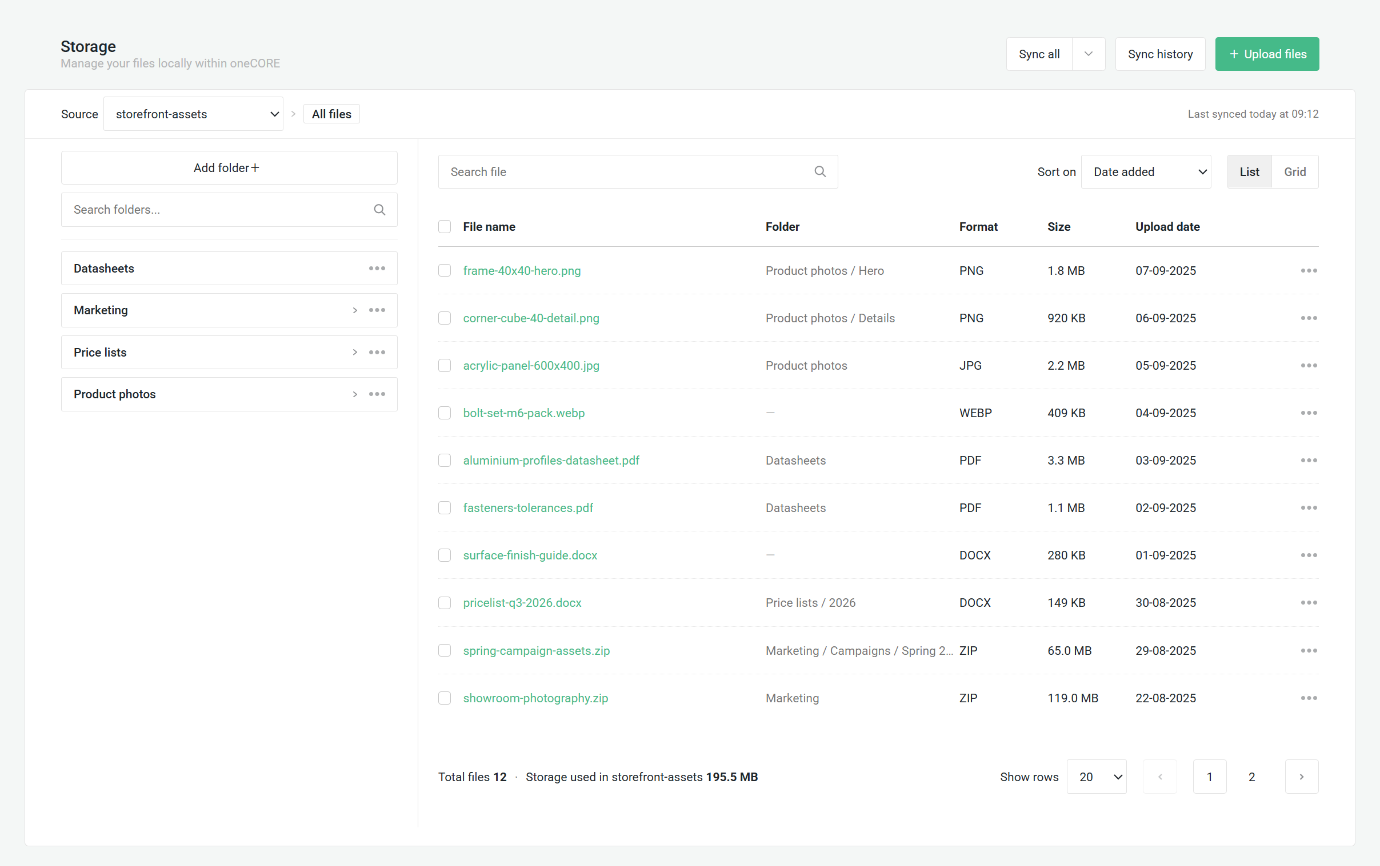
We’ve implemented a Storage Feature where you can upload and manage files directly on oneCORE. On the Storage feature, you can upload new files, organize files in folders, rename, move and delete them, search and sort the library, preview files and copy a link. In order to use the file on the page, we provide the file selection field type in component editor where tenant can select the file from storage. Please note that, to add the new field type to any component, it requires custom integration per component layout.
Campaign - Free Discount TypeCompleted
We’ve added a new “Free” discount type for campaigns. When a customer applies a Free voucher, the product price including edition's service fee and shipping cost will become 0. All the shipping method options are still visible for customers to choose. Transaction costs and any additional & service costs are still charged. The Free discount type is compatible with all existing campaign settings — Campaign type, Start date and end date, Unlimited usage, Voucher is bound to, Calculation rules, Country, Products — except for the discount value which will be disabled.
However, the shipping is only covered when every product in the order is part of the campaign. If an order contains products which are not eligible for Free campaign, customer must still pay for order's shipping cost.
To allow customers to complete their free order, product is required free payment method to be used with this Free discount type.
Read more: How to set up a campaign
Dynamic External Digital Stock ProvidersCompleted
We’ve added support for custom stock providers for digital products. You can now create and manage your own stock providers through the public API (/api/v2/digitalstockproviders). Also, you can create and update digital stock (/api/v2/digitalstocks) with a custom stock provider, average purchase price and stock amount. The price updates via API are sent to Google Merchant automatically. The external digital stock dashboard in Admin shows both system and custom stock origins.
Bug fixes 3
Orderflow Shipping Price Retrieve Realtime Shipping MethodCompleted
We fixed an issue where the shipping cost displayed on an existing order would reflect the current shipping method price rather than the price at the time the order turned to Created status. The shipping cost has always been saved to the order correctly — this fix ensures it is now displayed consistently from that saved value.
Service Cost List View BugCompleted
We fixed an issue where the service & additional cost list page displayed an incorrect total count and unnecessary pagination pages when service cost was soft deleted.
Enable Dynamic Subscription for Guest usersCompleted
We fixed the issue where the newsletter subscription checkbox on the orderflow's extra order field is not visible for the guest users.
Maintenance 12
Enhance 3D Look a Like Product - Remove JobCompleted
We removed a completed job.
Trigger on Order Status Change Creates Job for All StatusesCompleted
We've enhanced a job related to a Trigger on Order Status Changed. This won't make any changes to the function of the trigger.
Remove Unused Data from Orders - From CodeCompleted
We've removed the unused data from Orders.
Restructure of PagePageComponents EndpointCompleted
We restructure how we store the content and collection data in a page component along with recreating the PagePageComponent endpoint to be easier to update component settings and content. Every field in component and collection and each sub-collection row has its own ID. The existing content is moved to the new structure automatically. The Component Editor in Admin UI works as before and users can now name each of the sub-collection. Component settings and component content now have separate endpoints; details are provided as follows:
Not affected:
- GET /api/v2/pages/{id}/pagepagecomponents: listing the components on a page.
Updated:
- GET /api/v2/pages/{id}/pagepagecomponents/{pagePageComponentId}: now returns the content of each language with an ID on every field, collection and collection row.
- POST /api/v2/pages/{id}/pagepagecomponents: creates a component with its settings only (name, active, component, view order, allowed and forbidden countries). Content is no longer sent here.
- PUT and PATCH /api/v2/pages/{id}/pagepagecomponents/{pagePageComponentId}: update the same settings only.
- DELETE /api/v2/pages/{id}/pagepagecomponents/{pagePageComponentId}: deleting a component.
New: for component or collection content:
- POST /api/v2/pages/{id}/pagepagecomponents/{pagePageComponentId}/contents: adds content or value to a field.
- PUT and PATCH /api/v2/pages/{id}/pagepagecomponents/{pagePageComponentId}/contents/{contentId}: update the content or value.
- DELETE /api/v2/pages/{id}/pagepagecomponents/{pagePageComponentId}/contents?contentids=: clears the content or value of the specified fields.
New: for collections inside a component:
- PUT and PATCH /api/v2/pages/{id}/pagepagecomponents/{pagePageComponentId}/contents/{contentId}/collections/{collectionId}: edit the title and sort order of a collection row.
- DELETE /api/v2/pages/{id}/pagepagecomponents/{pagePageComponentId}/contents/{contentId}/collections?collectionids=: deletes the specified collection rows.
Note: during the migration, the ID can be seen as null.
Remove Steam Login - From CodeCompleted
We removed the Steam login option.
Clean up Orderflow V1Completed
We removed the Orderflow V1 along with 5 unused features from the previous version of Orderflow: DisableAutoFillAddress, RootEditionsAlwaysOpen, ShowEditionTags, ShowOnlyChildEditionsOfConfigurableProduct and ShowConfigurableProductWithRootEdition.
Remove /api/v2/shopuserachievements EndpointCompleted
We removed this endpoint /api/v2/shopuserachievements (DELETE). The replacement of API endpoint to delete shop user achievement is available in this URL /api/v2/shopusers/{id}/achievements.
Remove Assign Seats from Tickets - Remove DatabaseCompleted
We removed unused data from Database.
Enhance 3D Look a Like Product - Remove columnCompleted
We removed unused data from Database.